
Isaac Guest Meme Generator
Create Your Isaac Guest Meme

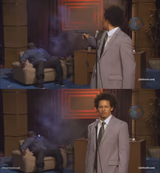
A guy in a bedroom mid-yell at his webcam with a bold text overlay behind him — perfect for over-the-top gaming rage or reaction captions. Free to caption.
Blank Isaac Guest meme template
Download the blank Isaac Guest template to caption it yourself, or add your text right here in the editor above and download the finished meme.
When to use the Isaac Guest meme
- Losing a ranked match to someone who's clearly hacking
- Reacting to a season finale plot twist
- Screaming into the void after a bad customer service call
Isaac Guest template facts
- Dimensions
- 581 × 353 px
- Format
- JPG
- Text boxes
- 2
- Added
- 2025
About the Isaac Guest meme template
This guy is losing it at his webcam, full volume, no chill, and honestly relatable if you've ever screamed at a video game or a group chat notification at 2am.
Use it for gaming rage quits, reacting to plot twists, or anytime someone needs to yell something with their whole chest.
Popular Isaac Guest caption ideas
YEAH, I'M INTO FITNESS · FITNESS WHOLE PIZZA IN MY MOUTH
when the boss kills you · for the 47th time
me finding out · there's no refunds
when someone says · 'it's just a game, calm down'






Isaac Guest meme FAQ
How do I make a Isaac Guest meme?
Scroll up to the Isaac Guest template, type your caption into the 2 text boxes in the editor above, adjust the font, size and color if you like, then click download. Your finished Isaac Guest meme is ready to share in seconds.
Can I use the Isaac Guest template for free?
Yes. The Isaac Guest template is completely free to use — no signup and no limits on how many memes you create or where you share them.
How do I download my Isaac Guest meme?
Click the download button under the editor once your Isaac Guest meme looks right. It saves straight to your device as a high-quality PNG or JPEG image.
How do I download the blank Isaac Guest template?
Use the "Download blank template" button in the blank Isaac Guest template section above to save the original, un-captioned image — handy if you'd rather caption it in another app or keep a copy.