
Ip grabber Meme Generator
Create Your Ip grabber Meme
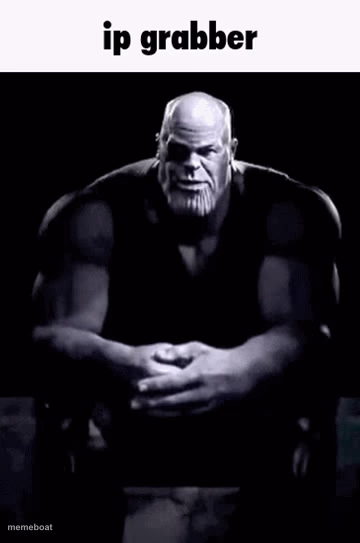
Thanos sits with hands folded in the dark, plotting something sinister — perfect for 'IP grabber' threats and villain scheming captions. Free & downloadable.
Blank Ip grabber meme template
Download the blank Ip grabber template to caption it yourself, or add your text right here in the editor above and download the finished meme.
When to use the Ip grabber meme
- Someone asks for your address in a group chat
- Replying to a rage-quit teammate in an online game
- Threatening to expose a friend's embarrassing search history
- Reacting to someone talking trash from behind a screen
Ip grabber template facts
- Dimensions
- 360 × 543 px
- Format
- PNG
- Added
- 2025
About the Ip grabber meme template
Big purple guy, black-and-white filter, hands steepled like he's about to end half the internet with a snap. This is peak Thanos scheming pose — the villain sitting alone in the dark, silently calculating his next move.
It's become the internet's go-to for 'I'm about to do something you'll regret' energy, hence the classic 'ip grabber' caption. Use it whenever someone's plotting quiet, menacing revenge — over Discord, group chats, or just to intimidate your friends for fun.
Templates similar to Ip grabber


Ip grabber meme FAQ
How do I make a Ip grabber meme?
Scroll up to the Ip grabber template, add your own text boxes in the editor above and type your captions, adjust the font, size and color if you like, then click download. Your finished Ip grabber meme is ready to share in seconds.
Can I use the Ip grabber template for free?
Yes. The Ip grabber template is completely free to use — no signup and no limits on how many memes you create or where you share them.
How do I download my Ip grabber meme?
Click the download button under the editor once your Ip grabber meme looks right. It saves straight to your device as a high-quality PNG or JPEG image.
How do I download the blank Ip grabber template?
Use the "Download blank template" button in the blank Ip grabber template section above to save the original, un-captioned image — handy if you'd rather caption it in another app or keep a copy.