
In My Day Meme Generator
Create Your In My Day Meme

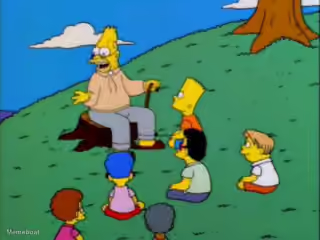
Grandpa Simpson yelling and pointing his finger mid-rant. The go-to template for old-man-yells-at-cloud jokes and outdated takes. Free to caption and share.
Blank In My Day meme template
Download the blank In My Day template to caption it yourself, or add your text right here in the editor above and download the finished meme.
When to use the In My Day meme
- Ranting about how things were better back in your day
- Getting angry about something completely unrelated to the topic
- Interrupting a conversation with an unhinged tangent
In My Day template facts
- Featuring
- Abraham 'Grandpa' Simpson (The Simpsons)
- Dimensions
- 740 × 740 px
- Format
- PNG
- Added
- 2025
About the In My Day meme template
Abe Simpson, mouth wide open mid-shout, finger jabbed in the air like he's about to launch into a story that has absolutely nothing to do with what you just said. This is the platonic ideal of "old man losing his train of thought but still furious about it."
Popular In My Day caption ideas
BACK IN MY DAY · TV STARS COULDN'T SAY BOOBIE, TUSHY, BURP, FANNY BURP, WATER CLOSET, UNDERPANTS, DINGLE DANGLE, BOSTON MARRIAGE, LBJ, TITICACA, HOT DOG OR FRONT LUMPS!





In My Day meme FAQ
How do I make a In My Day meme?
Scroll up to the In My Day template, add your own text boxes in the editor above and type your captions, adjust the font, size and color if you like, then click download. Your finished In My Day meme is ready to share in seconds.
Can I use the In My Day template for free?
Yes. The In My Day template is completely free to use — no signup and no limits on how many memes you create or where you share them.
How do I download my In My Day meme?
Click the download button under the editor once your In My Day meme looks right. It saves straight to your device as a high-quality PNG or JPEG image.
How do I download the blank In My Day template?
Use the "Download blank template" button in the blank In My Day template section above to save the original, un-captioned image — handy if you'd rather caption it in another app or keep a copy.