
I Bee Leaf In You Meme Generator
Create Your I Bee Leaf In You Meme
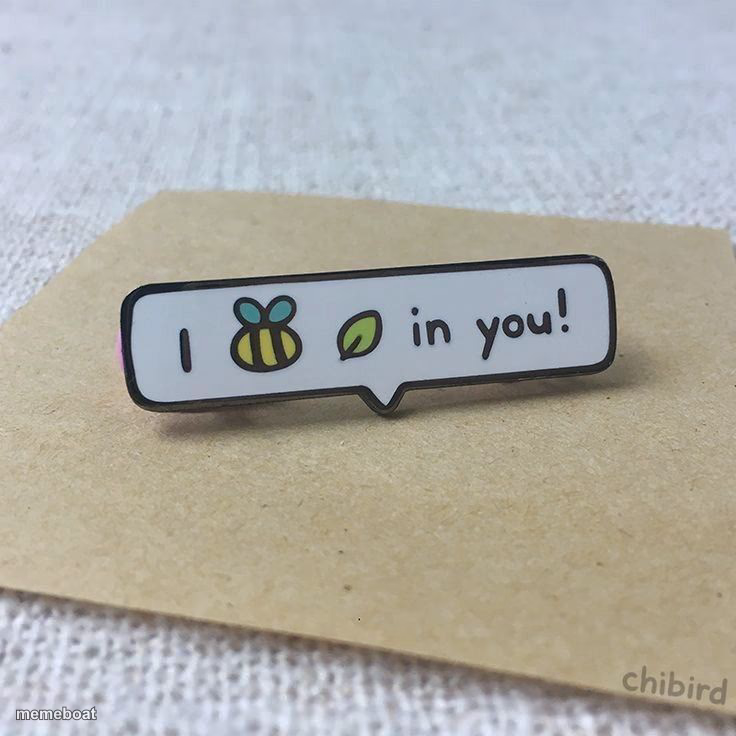
An enamel pin reading 'I bee-leaf in you' with a bee and leaf emoji — perfect for wholesome pun captions and encouragement memes. Caption it free.
Blank I Bee Leaf In You meme template
Download the blank I Bee Leaf In You template to caption it yourself, or add your text right here in the editor above and download the finished meme.
When to use the I Bee Leaf In You meme
- Sending wholesome encouragement with a pun twist
- Captioning support for a friend before a big test or interview
- Reacting to cheesy but effective pep talks
- Pairing with any 'believe in yourself' moment that needs a pun
I Bee Leaf In You template facts
- Dimensions
- 736 × 736 px
- Format
- JPG
- Text boxes
- 2
- Added
- 2025
About the I Bee Leaf In You meme template
A tiny enamel pin sitting on kraft paper says it all with a bee and a leaf standing in for the words 'believe' — 'I bee-leaf in you.' It's the kind of pun that makes you groan and smile at the same time.
Popular I Bee Leaf In You caption ideas
When your friend fails · but you still bee-leaf in them
Me sending this · instead of actual advice
Motivational speaker: · *shows up as a pun pin*
Templates similar to I Bee Leaf In You


I Bee Leaf In You meme FAQ
How do I make a I Bee Leaf In You meme?
Scroll up to the I Bee Leaf In You template, type your caption into the 2 text boxes in the editor above, adjust the font, size and color if you like, then click download. Your finished I Bee Leaf In You meme is ready to share in seconds.
Can I use the I Bee Leaf In You template for free?
Yes. The I Bee Leaf In You template is completely free to use — no signup and no limits on how many memes you create or where you share them.
How do I download my I Bee Leaf In You meme?
Click the download button under the editor once your I Bee Leaf In You meme looks right. It saves straight to your device as a high-quality PNG or JPEG image.
How do I download the blank I Bee Leaf In You template?
Use the "Download blank template" button in the blank I Bee Leaf In You template section above to save the original, un-captioned image — handy if you'd rather caption it in another app or keep a copy.