
I identify as Meme Generator
Create Your I identify as Meme
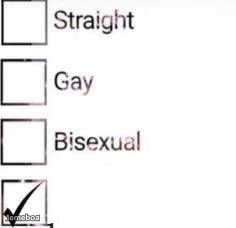
A checklist of Straight, Gay, Bisexual with a checkmark placed outside all the boxes — perfect for jokes about identifying as something absurd. Caption and download free.
Blank I identify as meme template
Download the blank I identify as template to caption it yourself, or add your text right here in the editor above and download the finished meme.
When to use the I identify as meme
- Someone jokingly refusing to fit into any of the given categories
- Relationship status memes where none of the options apply
I identify as template facts
- Dimensions
- 236 × 228 px
- Format
- JPG
- Text boxes
- 2
- Added
- 2026
About the I identify as meme template
Three neat little checkboxes for Straight, Gay, and Bisexual, and then a checkmark sitting defiantly below all of them, refusing to pick a lane. It's the visual punchline before you even add text.
Use it for "I identify as ___" jokes where the answer is deliberately ridiculous, off-topic, or self-deprecating — a food, an inanimate object, a Wi-Fi router, anything but a normal answer. The setup does the work; you just need the last box label.
Popular I identify as caption ideas
MUFFIN
I identify as · a burnt lasagna
I identify as · the group project member who did nothing
I identify as · the last slice nobody takes
Templates similar to I identify as



I identify as meme FAQ
How do I make a I identify as meme?
Scroll up to the I identify as template, type your caption into the 2 text boxes in the editor above, adjust the font, size and color if you like, then click download. Your finished I identify as meme is ready to share in seconds.
Can I use the I identify as template for free?
Yes. The I identify as template is completely free to use — no signup and no limits on how many memes you create or where you share them.
How do I download my I identify as meme?
Click the download button under the editor once your I identify as meme looks right. It saves straight to your device as a high-quality PNG or JPEG image.
How do I download the blank I identify as template?
Use the "Download blank template" button in the blank I identify as template section above to save the original, un-captioned image — handy if you'd rather caption it in another app or keep a copy.