
humr Meme Generator
Create Your humr Meme
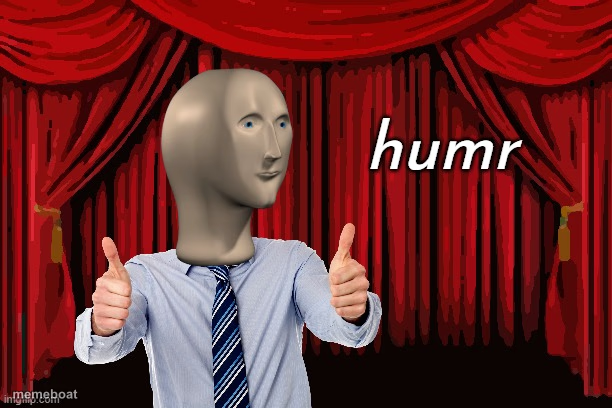
Meme Man giving two thumbs up in front of red theater curtains under the word "humr" - the deadpan mascot of ironic comedy. Caption and download free.
Blank humr meme template
Download the blank humr template to caption it yourself, or add your text right here in the editor above and download the finished meme.
When to use the humr meme
- Ironically approving of a bad joke or pun
- Reacting to comedy that's so bad it's good
- Captioning forced enthusiasm for something mediocre
- Presenting a "joke" that clearly needed more work
humr template facts
- Featuring
- Meme Man (Meme Man series)
- Dimensions
- 612 × 408 px
- Format
- PNG
- Text boxes
- 1
- Added
- 2025
About the humr meme template
It's Meme Man, the smooth-headed CGI mascot of ultra-dry internet humor, striking his signature double thumbs-up pose in front of a cheesy red curtain backdrop. The word "humr" hovering next to him is basically a wink at how flat and deliberately unfunny this whole aesthetic is supposed to look.
Use it for jokes about comedy that isn't landing, ironic approval, or anytime you want to endorse something with maximum enthusiasm and zero actual emotion. It's the perfect template for deadpan sarcasm dressed up as showbiz.
Popular humr caption ideas
FRIEND: TELLS FUNNY JOKE · ME:
comedy
that pun you just made
dad jokes at thanksgiving
Templates similar to humr



humr meme FAQ
How do I make a humr meme?
Scroll up to the humr template, type your caption into the text box in the editor above, adjust the font, size and color if you like, then click download. Your finished humr meme is ready to share in seconds.
Can I use the humr template for free?
Yes. The humr template is completely free to use — no signup and no limits on how many memes you create or where you share them.
How do I download my humr meme?
Click the download button under the editor once your humr meme looks right. It saves straight to your device as a high-quality PNG or JPEG image.
How do I download the blank humr template?
Use the "Download blank template" button in the blank humr template section above to save the original, un-captioned image — handy if you'd rather caption it in another app or keep a copy.