
How to Hug Meme Generator
Create Your How to Hug Meme
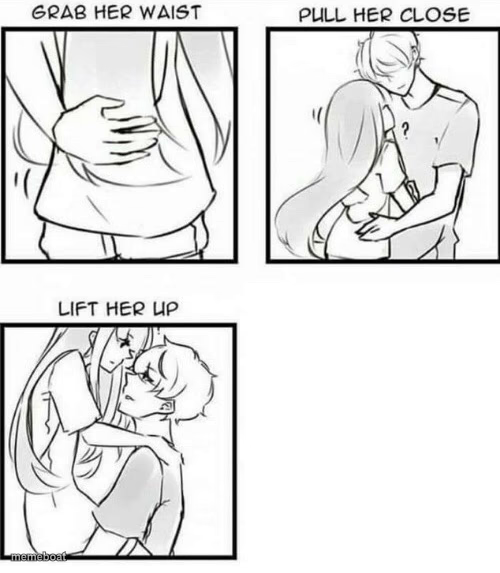
3-panel anime hug tutorial comic: grab waist, pull close, lift her up. Swap the steps for any awkward how-to joke. Caption free, download instantly.
Blank How to Hug meme template
Download the blank How to Hug template to caption it yourself, or add your text right here in the editor above and download the finished meme.
When to use the How to Hug meme
- Turning any tender moment into a step-by-step instructional joke
- Replacing the hug steps with a chaotic wrong way to do something simple
- Relationship meme about someone overthinking basic affection
- Parody tutorial for literally any task, romantic or not
How to Hug template facts
- Dimensions
- 500 × 573 px
- Format
- JPG
- Text boxes
- 2
- Added
- 2025
About the How to Hug meme template
This one's a sweet little anime-style instructional comic: three panels walking through the 'proper' technique for hugging someone, from waist-grab to full lift-off. It's got that soft, sincere webcomic energy that makes it perfect for undercutting with something completely unhinged.
Popular How to Hug caption ideas
STEP 1: TEXT HER 'WYD' · STEP 2: WAIT 3 HOURS FOR A REPLY
HOW TO ASK FOR A RAISE · GET REJECTED ANYWAY
ME OPENING THE FRIDGE AT 2AM · ME CLOSING IT WITH NOTHING
Templates similar to How to Hug






How to Hug meme FAQ
How do I make a How to Hug meme?
Scroll up to the How to Hug template, type your caption into the 2 text boxes in the editor above, adjust the font, size and color if you like, then click download. Your finished How to Hug meme is ready to share in seconds.
Can I use the How to Hug template for free?
Yes. The How to Hug template is completely free to use — no signup and no limits on how many memes you create or where you share them.
How do I download my How to Hug meme?
Click the download button under the editor once your How to Hug meme looks right. It saves straight to your device as a high-quality PNG or JPEG image.
How do I download the blank How to Hug template?
Use the "Download blank template" button in the blank How to Hug template section above to save the original, un-captioned image — handy if you'd rather caption it in another app or keep a copy.