
Homework Flowchart Meme Generator
Create Your Homework Flowchart Meme
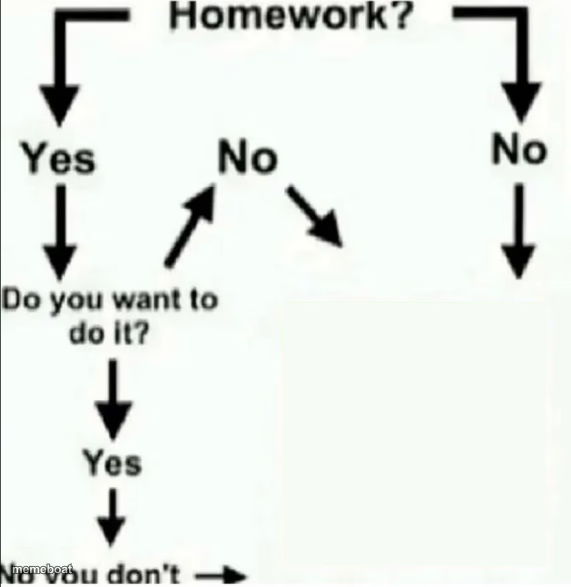
The classic homework decision flowchart that always loops back to "do you don't" — caption the boxes and download it free on Memebo.at.
Blank Homework Flowchart meme template
Download the blank Homework Flowchart template to caption it yourself, or add your text right here in the editor above and download the finished meme.
When to use the Homework Flowchart meme
- Any task you've been avoiding for a week
- Explaining why the report still isn't done
- Describing your relationship with the gym
- Justifying skipping a chore for the fifth day in a row
Homework Flowchart template facts
- Featuring
- Homework Flowchart (Classic flowchart meme)
- Dimensions
- 571 × 587 px
- Format
- PNG
- Text boxes
- 1
- Added
- 2025
About the Homework Flowchart meme template
This flowchart has been circulating forever because it's painfully accurate: every path, no matter how you answer, ends the exact same way. It's procrastination logic laid out in arrows and boxes, and somehow that makes it funnier.
Popular Homework Flowchart caption ideas
WATCH THE DEADPOOL MOVIES
going to the gym?
answering that email?
cleaning your room?

Homework Flowchart meme FAQ
How do I make a Homework Flowchart meme?
Scroll up to the Homework Flowchart template, type your caption into the text box in the editor above, adjust the font, size and color if you like, then click download. Your finished Homework Flowchart meme is ready to share in seconds.
Can I use the Homework Flowchart template for free?
Yes. The Homework Flowchart template is completely free to use — no signup and no limits on how many memes you create or where you share them.
How do I download my Homework Flowchart meme?
Click the download button under the editor once your Homework Flowchart meme looks right. It saves straight to your device as a high-quality PNG or JPEG image.
How do I download the blank Homework Flowchart template?
Use the "Download blank template" button in the blank Homework Flowchart template section above to save the original, un-captioned image — handy if you'd rather caption it in another app or keep a copy.