
Homer Chocolate Meme Generator
Create Your Homer Chocolate Meme
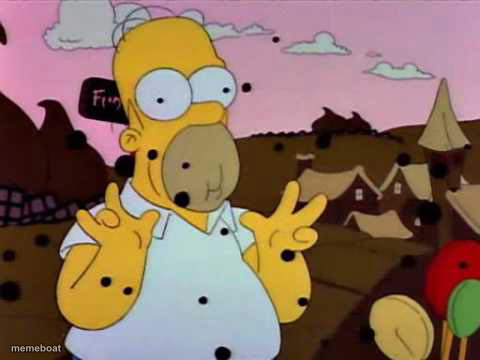
Homer Simpson doing his classic finger-wiggle retreat before vanishing into the hedge. The ultimate 'nope, not dealing with this' escape meme. Caption it free.
Blank Homer Chocolate meme template
Download the blank Homer Chocolate template to caption it yourself, or add your text right here in the editor above and download the finished meme.
When to use the Homer Chocolate meme
- Avoiding a coworker who wants to talk about 'quick sync'
- Leaving a group chat the moment drama starts
- Dodging a question you really don't want to answer
Homer Chocolate template facts
- Featuring
- Homer Simpson (The Simpsons)
- Dimensions
- 480 × 360 px
- Format
- JPG
- Added
- 2025
About the Homer Chocolate meme template
This is the gold standard of nope-outs. Homer wiggles his fingers, gives a nervous grin, and prepares to vanish backwards into a bush rather than deal with whatever's in front of him — a scene so iconic it basically invented the concept of gracefully bailing.
Use it for dodging responsibility, avoiding an awkward conversation, or noping out of literally anything the second it gets uncomfortable.
Templates similar to Homer Chocolate

Homer Chocolate meme FAQ
How do I make a Homer Chocolate meme?
Scroll up to the Homer Chocolate template, add your own text boxes in the editor above and type your captions, adjust the font, size and color if you like, then click download. Your finished Homer Chocolate meme is ready to share in seconds.
Can I use the Homer Chocolate template for free?
Yes. The Homer Chocolate template is completely free to use — no signup and no limits on how many memes you create or where you share them.
How do I download my Homer Chocolate meme?
Click the download button under the editor once your Homer Chocolate meme looks right. It saves straight to your device as a high-quality PNG or JPEG image.
How do I download the blank Homer Chocolate template?
Use the "Download blank template" button in the blank Homer Chocolate template section above to save the original, un-captioned image — handy if you'd rather caption it in another app or keep a copy.