
Video Call Boardroom Suggestion Meme Generator
Create Your Video Call Boardroom Suggestion Meme
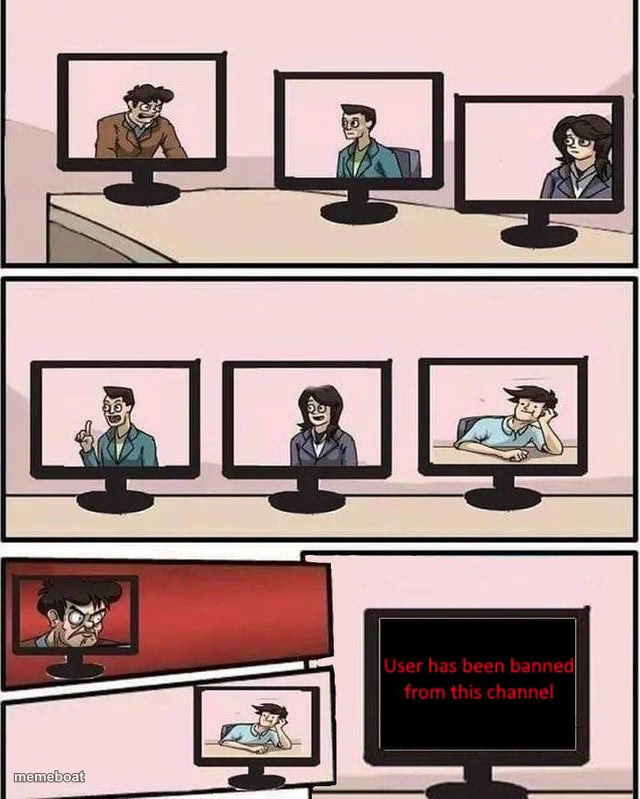
Three video-call monitors reject an idea, then one gets banned. Perfect for online meetings and Discord drama. Caption it free.
Blank Video Call Boardroom Suggestion meme template
Download the blank Video Call Boardroom Suggestion template to caption it yourself, or add your text right here in the editor above and download the finished meme.
When to use the Video Call Boardroom Suggestion meme
- Someone suggests moving the meeting to 9am and gets banned from the calendar
- Suggesting 'reply-all is fine actually' on a work Zoom call
- Pitching pineapple on pizza in the group chat and getting muted forever
Video Call Boardroom Suggestion template facts
- Dimensions
- 640 × 799 px
- Format
- JPG
- Text boxes
- 2
- Added
- 2025
About the Video Call Boardroom Suggestion meme template
Three coworkers on a video call, each shown on their own monitor. Someone pitches an idea, gets the same dead-eyed rejection from everyone else, argues back — and gets banned from the channel for it. It's the classic Boardroom Suggestion format, just moved from the conference table to the group call, which somehow makes the pettiness funnier.
Use it for any online meeting, group chat, or Discord server where one person's idea gets instantly shut down and they don't take it well. Swap in your own terrible pitch and watch it get banned in three easy panels.
Popular Video Call Boardroom Suggestion caption ideas
Bro suggests we use Comic Sans for the deck · Bro gets banned from the channel
Says 'can we push standup to 8am' · User has been banned from this channel
"What if we made this a weekly meeting" · Banned. Instantly. No warning.
Templates similar to Video Call Boardroom Suggestion




Video Call Boardroom Suggestion meme FAQ
How do I make a Video Call Boardroom Suggestion meme?
Scroll up to the Video Call Boardroom Suggestion template, type your caption into the 2 text boxes in the editor above, adjust the font, size and color if you like, then click download. Your finished Video Call Boardroom Suggestion meme is ready to share in seconds.
Can I use the Video Call Boardroom Suggestion template for free?
Yes. The Video Call Boardroom Suggestion template is completely free to use — no signup and no limits on how many memes you create or where you share them.
How do I download my Video Call Boardroom Suggestion meme?
Click the download button under the editor once your Video Call Boardroom Suggestion meme looks right. It saves straight to your device as a high-quality PNG or JPEG image.
How do I download the blank Video Call Boardroom Suggestion template?
Use the "Download blank template" button in the blank Video Call Boardroom Suggestion template section above to save the original, un-captioned image — handy if you'd rather caption it in another app or keep a copy.