
Hoo Lee Sheet Meme Generator
Create Your Hoo Lee Sheet Meme
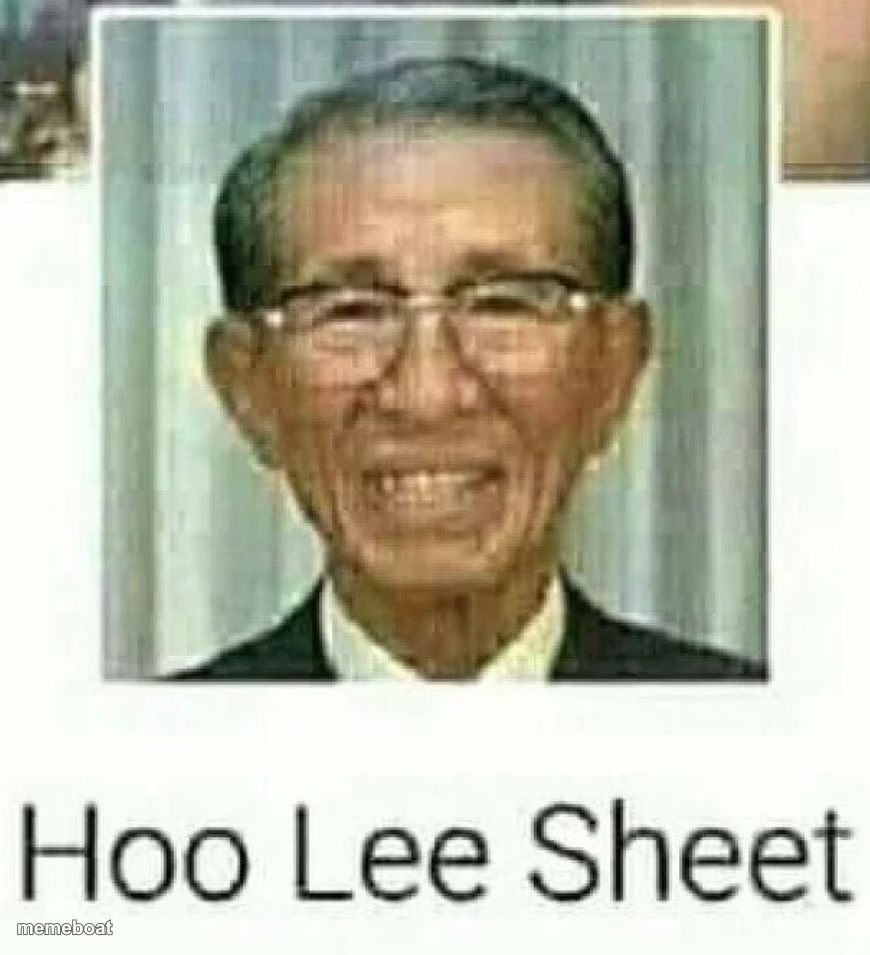
The grinning elderly man whose caption spells out 'Hoo Lee Sheet' — a classic wordplay meme for reacting to absolute chaos. Caption and download free.
Blank Hoo Lee Sheet meme template
Download the blank Hoo Lee Sheet template to caption it yourself, or add your text right here in the editor above and download the finished meme.
When to use the Hoo Lee Sheet meme
- Reacting to an insane plot twist or news headline
- When the bill at dinner is way higher than expected
- Seeing your bank account after a weekend trip
- Any moment that deserves a dramatic 'holy sheet' reaction
Hoo Lee Sheet template facts
- Dimensions
- 870 × 955 px
- Format
- PNG
- Text boxes
- 2
- Added
- 2025
About the Hoo Lee Sheet meme template
A cheerful older gentleman photo captioned to sound out 'Holy Sheet' — one of the internet's oldest and most reliable pun memes. The delivery is deadpan, the pun is dumb, and that's exactly why it works every single time.
Popular Hoo Lee Sheet caption ideas
When you realize taht you read this line wrong: · Now read the the title again
HOO LEE SHEET · THAT'S A LOT OF ZEROS
HOO LEE SHEET · DID HE REALLY JUST SAY THAT
HOO LEE SHEET · MY WIFI BILL THIS MONTH
Templates similar to Hoo Lee Sheet



Hoo Lee Sheet meme FAQ
How do I make a Hoo Lee Sheet meme?
Scroll up to the Hoo Lee Sheet template, type your caption into the 2 text boxes in the editor above, adjust the font, size and color if you like, then click download. Your finished Hoo Lee Sheet meme is ready to share in seconds.
Can I use the Hoo Lee Sheet template for free?
Yes. The Hoo Lee Sheet template is completely free to use — no signup and no limits on how many memes you create or where you share them.
How do I download my Hoo Lee Sheet meme?
Click the download button under the editor once your Hoo Lee Sheet meme looks right. It saves straight to your device as a high-quality PNG or JPEG image.
How do I download the blank Hoo Lee Sheet template?
Use the "Download blank template" button in the blank Hoo Lee Sheet template section above to save the original, un-captioned image — handy if you'd rather caption it in another app or keep a copy.