
Hi there Meme Generator
Create Your Hi there Meme

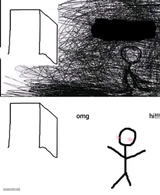
A pitch-black creepy skull face with a wide, unsettling grin. Great for jumpscare jokes, horror reactions, and 'something's watching you' captions.
Blank Hi there meme template
Download the blank Hi there template to caption it yourself, or add your text right here in the editor above and download the finished meme.
When to use the Hi there meme
- Dropping it as a fake jumpscare in a group chat
- Captioning 'when the WiFi finally works' with menace
- Reacting to something so cursed words fail
- Halloween posts needing a genuinely unsettling image
Hi there template facts
- Dimensions
- 215 × 234 px
- Format
- JPG
- Text boxes
- 2
- Added
- 2026
About the Hi there meme template
This one lives in the dark corner of the meme folder. A near-black frame, two hollow eye sockets, and a jagged grin stretching almost ear to ear — it's the visual equivalent of that feeling when you hear a floorboard creak at 3am.
Use it for jumpscare bait, cursed group chat drops, or captioning the exact moment your search history catches up to you. It doesn't need a punchline to work; it just needs to show up uninvited.
Popular Hi there caption ideas
I HAVE TO TELL YOU THIS · MUSHROOM DOES NOT BELONG ON PIZZA
me at 3am · when I hear a noise downstairs
your search history · catching up to you
nothing · just wanted to say hi


Hi there meme FAQ
How do I make a Hi there meme?
Scroll up to the Hi there template, type your caption into the 2 text boxes in the editor above, adjust the font, size and color if you like, then click download. Your finished Hi there meme is ready to share in seconds.
Can I use the Hi there template for free?
Yes. The Hi there template is completely free to use — no signup and no limits on how many memes you create or where you share them.
How do I download my Hi there meme?
Click the download button under the editor once your Hi there meme looks right. It saves straight to your device as a high-quality PNG or JPEG image.
How do I download the blank Hi there template?
Use the "Download blank template" button in the blank Hi there template section above to save the original, un-captioned image — handy if you'd rather caption it in another app or keep a copy.