
Henry Stickmin Skydive Face Meme Generator
Create Your Henry Stickmin Skydive Face Meme
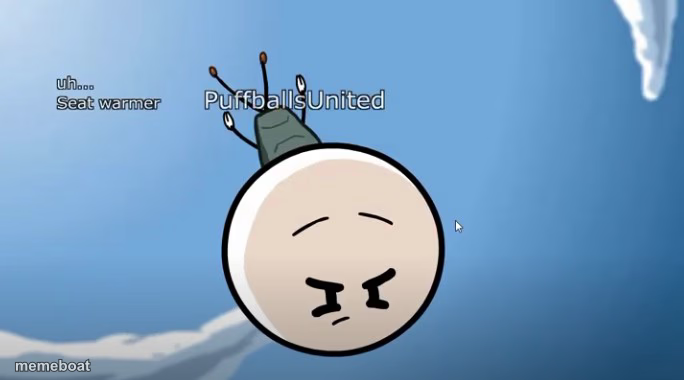
Round-headed cartoon guy mid-freefall with a nervous scrunched-up face and 'uh... seat warmer' caption. Perfect for oh-no moments. Caption free.
Blank Henry Stickmin Skydive Face meme template
Download the blank Henry Stickmin Skydive Face template to caption it yourself, or add your text right here in the editor above and download the finished meme.
When to use the Henry Stickmin Skydive Face meme
- Getting called out for a lie you clearly just made up
- Realizing your excuse makes zero sense the second you say it
- Committing to a bad decision with no way to back out
- That split second after you hit send on a message you shouldn't have
Henry Stickmin Skydive Face template facts
- Featuring
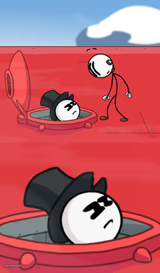
- Henry Stickmin (Toppat pilot skydiving scene) (Henry Stickmin Collection (PuffballsUnited animation))
- Dimensions
- 684 × 380 px
- Format
- JPG
- Text boxes
- 2
- Added
- 2025
About the Henry Stickmin Skydive Face meme template
The Henry Stickmin epic skydive meme originates from the popular Henry Stickmin game series, known for its quirky humor and unexpected outcomes. This meme template captures a memorable skydive scene that quickly became a viral phenomenon across social media platforms like Twitter and Reddit around 2020. As part of internet culture, it reflects the playful and adventurous spirit of meme culture, making it a favorite among fans of gaming and viral content alike. The Henry Stickmin epic skydive meme type stands out for its comedic timing and relatable expression, embedding itself deeply in online entertainment and meme history.
Using the Henry Stickmin epic skydive meme template is perfect for adding humor to social media content, especially when reacting to surprising or risky situations. If you're wondering how to use this meme effectively, it works best when paired with captions that highlight unexpected outcomes or bold decisions. This template is ideal for funny reactions, relatable moments, and engaging posts on platforms like Instagram, TikTok, Facebook, and Twitter. Whether you want to make a meme about taking a leap of faith or just share a hilarious skydive moment, this meme maker helps you create content that resonates emotionally and entertains your audience.
The popularity of the Henry Stickmin epic skydive meme remains strong due to its versatility and shareability. Users can easily create, customize, and personalize their own versions using our online meme generator, which requires no design skills and delivers instant results. This meme template offers viral potential by encouraging social media engagement through funny, trending, and shareable content. Ready to generate your own Henry Stickmin epic skydive meme? Start now with our free, quick, and easy meme maker to build viral memes that capture attention and spread laughter across the internet.
Popular Henry Stickmin Skydive Face caption ideas
ME EXPLAINING WHY I'M LATE · "TRAFFIC... IN MY OWN HOUSE"
BOSS: WHY IS THE REPORT LATE? · "UH... SEAT WARMER"
WHEN THE LIE FALLS APART MID-SENTENCE · AND YOU JUST KEEP GOING ANYWAY
Templates similar to Henry Stickmin Skydive Face


Henry Stickmin Skydive Face meme FAQ
How do I make a Henry Stickmin Skydive Face meme?
Scroll up to the Henry Stickmin Skydive Face template, type your caption into the 2 text boxes in the editor above, adjust the font, size and color if you like, then click download. Your finished Henry Stickmin Skydive Face meme is ready to share in seconds.
Can I use the Henry Stickmin Skydive Face template for free?
Yes. The Henry Stickmin Skydive Face template is completely free to use — no signup and no limits on how many memes you create or where you share them.
How do I download my Henry Stickmin Skydive Face meme?
Click the download button under the editor once your Henry Stickmin Skydive Face meme looks right. It saves straight to your device as a high-quality PNG or JPEG image.
How do I download the blank Henry Stickmin Skydive Face template?
Use the "Download blank template" button in the blank Henry Stickmin Skydive Face template section above to save the original, un-captioned image — handy if you'd rather caption it in another app or keep a copy.