
Heavy is dead Meme Generator
Create Your Heavy is dead Meme

Team Fortress 2's iconic "HEAVY IS DEAD" screen — the ultimate template for announcing any dramatic, over-the-top loss. Caption and download free.
Blank Heavy is dead meme template
Download the blank Heavy is dead template to caption it yourself, or add your text right here in the editor above and download the finished meme.
When to use the Heavy is dead meme
- Announcing your diet died the second the pizza arrived
- Declaring your motivation officially deceased on a Monday
- Killing off a running joke that's finally gone too far
- Reporting the death of your phone battery at 40%
Heavy is dead template facts
- Featuring
- Heavy (Team Fortress 2)
- Dimensions
- 320 × 180 px
- Format
- JPG
- Text boxes
- 1
- Added
- 2026
About the Heavy is dead meme template
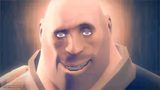
Straight out of Team Fortress 2, this is the death screen every player has seen a thousand times: bold red caps declaring that the big guy has fallen. It's blunt, it's dramatic, and it works for way more than just Sandvich-related tragedies.
Swap the name for anything that just met its end — your motivation, your diet, your group project, your Wi-Fi connection. The format does the comedy for you.
Popular Heavy is dead caption ideas
MY MOTIVATION IS DEAD
MY DIET IS DEAD
THE GROUP PROJECT IS DEAD
Templates similar to Heavy is dead
Heavy is dead meme FAQ
How do I make a Heavy is dead meme?
Scroll up to the Heavy is dead template, type your caption into the text box in the editor above, adjust the font, size and color if you like, then click download. Your finished Heavy is dead meme is ready to share in seconds.
Can I use the Heavy is dead template for free?
Yes. The Heavy is dead template is completely free to use — no signup and no limits on how many memes you create or where you share them.
How do I download my Heavy is dead meme?
Click the download button under the editor once your Heavy is dead meme looks right. It saves straight to your device as a high-quality PNG or JPEG image.
How do I download the blank Heavy is dead template?
Use the "Download blank template" button in the blank Heavy is dead template section above to save the original, un-captioned image — handy if you'd rather caption it in another app or keep a copy.