
Happy Patrick Meme Generator
Create Your Happy Patrick Meme
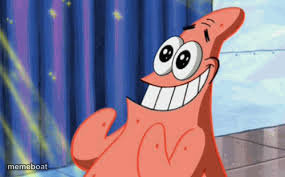
Patrick Star grinning ear to ear with wide excited eyes, the go-to reaction for pure joy or unhinged excitement. Free to caption and download.
Blank Happy Patrick meme template
Download the blank Happy Patrick template to caption it yourself, or add your text right here in the editor above and download the finished meme.
When to use the Happy Patrick meme
- Being way too excited about something trivial
- That feeling when your food order arrives early
- Hyping up a friend's mediocre achievement
Happy Patrick template facts
- Featuring
- Patrick Star (SpongeBob SquarePants)
- Dimensions
- 285 × 177 px
- Format
- JPG
- Text boxes
- 1
- Added
- 2025
About the Happy Patrick meme template
Patrick's got that huge, slightly manic grin going, eyes bugging out with pure delight like he just heard the best news of his life. It's one of the most versatile happy-reaction faces in the whole SpongeBob catalog.
Perfect for genuine excitement, sarcastic excitement, or anything where the joke is 'this person is way too hyped about something dumb.'
Popular Happy Patrick caption ideas
When the waiter says the fries are free today
Me finding out there's a 3-day weekend
When your crush likes your story
Templates similar to Happy Patrick



Happy Patrick meme FAQ
How do I make a Happy Patrick meme?
Scroll up to the Happy Patrick template, type your caption into the text box in the editor above, adjust the font, size and color if you like, then click download. Your finished Happy Patrick meme is ready to share in seconds.
Can I use the Happy Patrick template for free?
Yes. The Happy Patrick template is completely free to use — no signup and no limits on how many memes you create or where you share them.
How do I download my Happy Patrick meme?
Click the download button under the editor once your Happy Patrick meme looks right. It saves straight to your device as a high-quality PNG or JPEG image.
How do I download the blank Happy Patrick template?
Use the "Download blank template" button in the blank Happy Patrick template section above to save the original, un-captioned image — handy if you'd rather caption it in another app or keep a copy.