
haha that was so funny Meme Generator
Create Your haha that was so funny Meme
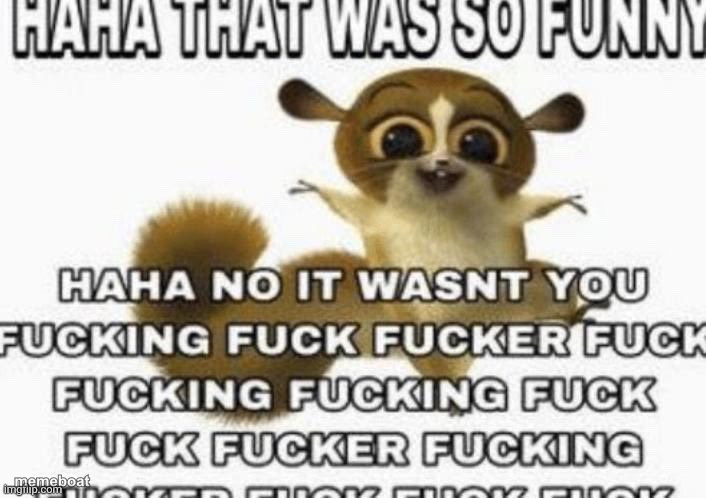
The wide-eyed mouse lemur meme that goes from cheerful 'haha that was so funny' to a furious profanity spiral. Add your own joke and roast. Free to caption.
Blank haha that was so funny meme template
Download the blank haha that was so funny template to caption it yourself, or add your text right here in the editor above and download the finished meme.
When to use the haha that was so funny meme
- Reacting to a joke that bombed completely
- When someone 'just kidding's their way out of an insult
- Fake laughing at your boss's joke in a meeting
- Responding to a prank that went too far
haha that was so funny template facts
- Dimensions
- 706 × 498 px
- Format
- PNG
- Added
- 2025
About the haha that was so funny meme template
This wide-eyed little lemur (from the Madagascar movies) has become the internet's go-to face for fake enthusiasm curdling into pure rage. The setup is always sweet, the follow-through is never.
It's built for the classic bait-and-switch joke: start nice, end furious. Perfect when someone's 'joke' really, really wasn't funny.
Templates similar to haha that was so funny

haha that was so funny meme FAQ
How do I make a haha that was so funny meme?
Scroll up to the haha that was so funny template, add your own text boxes in the editor above and type your captions, adjust the font, size and color if you like, then click download. Your finished haha that was so funny meme is ready to share in seconds.
Can I use the haha that was so funny template for free?
Yes. The haha that was so funny template is completely free to use — no signup and no limits on how many memes you create or where you share them.
How do I download my haha that was so funny meme?
Click the download button under the editor once your haha that was so funny meme looks right. It saves straight to your device as a high-quality PNG or JPEG image.
How do I download the blank haha that was so funny template?
Use the "Download blank template" button in the blank haha that was so funny template section above to save the original, un-captioned image — handy if you'd rather caption it in another app or keep a copy.