Hacker Video Meme Generator
Create Your Hacker Meme
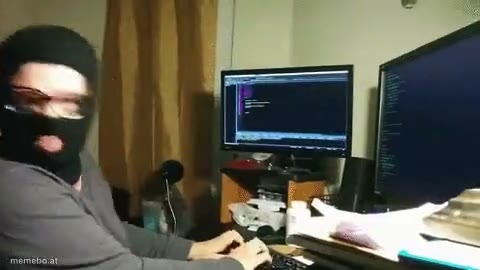
The Hacker video clip, ready for captions. Add text over the clip and save the meme as a GIF or MP4.
Blank Hacker meme template
Download the blank Hacker clip to caption it yourself, or add your text right here in the editor above and save the finished meme.
Hacker template facts
- Dimensions
- 480 × 270 px
- Format
- MP4
- Text boxes
- 2
- Added
- 2026
Popular Hacker caption ideas
I guess why linux distros had firefox on them
Windows users : "installing a web browser is so easy" · Linux users :
Coder
The future me becoming a coder by taking secret internet WiFi passwords from other places:
Checking my search history
TEACHERS CHECKING MY SEARCH HISTORY ON THE SCHOOL COMPUTER
I accesed the system
ME HACKING SCHOOL SERVERS TO ADD THE 0,1 I NEED TO PASS MATH
true
how it feels to watch a downloaded youtube video offline
Enter a clever title for your gif!
ME HAVING THE SUDDEN URGE TO CHANGE ALL MY PASSWORDS BECAUSE I'M BEING PARANOID
Me deleting ++++hub to see my friends reaction
ME DELETING ****HUB FROM THE ENTIRE INTERNET
One of the things I still don't understand
How my grandparents see me when i close 1 tab on their pc
hcker mannnn
ME AND THE BOYS PLAYING UN BLOCKED GAMES ON THE SCHOOL CHROME BOOKS




Hacker meme FAQ
How do I make a Hacker meme?
Scroll up to the Hacker clip, type your caption into the 2 text boxes in the editor above, adjust the font, size and color if you like, then save it as a GIF or MP4. Your finished Hacker meme is ready to share in seconds.
Can I use the Hacker template for free?
Yes. The Hacker template is completely free to use — no signup and no limits on how many memes you create or where you share them.
How do I download my Hacker meme?
Click the download button under the editor once your Hacker meme looks right. It saves to your device as a GIF of up to 10 seconds, or as an MP4 video in browsers that can make one.
How do I download the blank Hacker template?
Use the "Download blank template" button in the blank Hacker template section above to save the original clip as an MP4, without captions.