
Guten Tag Dog Meme Generator
Create Your Guten Tag Dog Meme
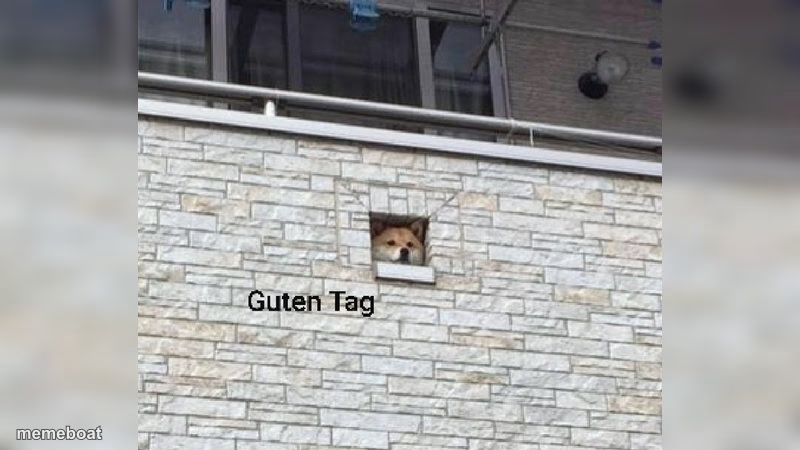
A dog poking its head out of a tiny square window in a stone wall, greeting you like a nosy neighbor. Caption it and download free.
Blank Guten Tag Dog meme template
Download the blank Guten Tag Dog template to caption it yourself, or add your text right here in the editor above and download the finished meme.
When to use the Guten Tag Dog meme
- Popping your head out unexpectedly to greet or scare someone
- That one neighbor who watches the street all day
- Showing up somewhere you clearly weren't invited
- Peak nosy behavior from pets or coworkers
Guten Tag Dog template facts
- Dimensions
- 800 × 450 px
- Format
- JPG
- Text boxes
- 2
- Added
- 2025
About the Guten Tag Dog meme template
This dog found the one perfectly dog-sized window in the entire building and now lives there full-time, judging everyone who walks by. There's something deeply funny about an animal appearing exactly where architecture says it shouldn't.
Popular Guten Tag Dog caption ideas
Me: *Trying to sleep* · That cringe thing I did 8 years ago:
When you hear the chip bag open · from three rooms away
Me checking if the mailman · is scared of dogs yet
Neighborhood watch · reporting for duty
Templates similar to Guten Tag Dog


Guten Tag Dog meme FAQ
How do I make a Guten Tag Dog meme?
Scroll up to the Guten Tag Dog template, type your caption into the 2 text boxes in the editor above, adjust the font, size and color if you like, then click download. Your finished Guten Tag Dog meme is ready to share in seconds.
Can I use the Guten Tag Dog template for free?
Yes. The Guten Tag Dog template is completely free to use — no signup and no limits on how many memes you create or where you share them.
How do I download my Guten Tag Dog meme?
Click the download button under the editor once your Guten Tag Dog meme looks right. It saves straight to your device as a high-quality PNG or JPEG image.
How do I download the blank Guten Tag Dog template?
Use the "Download blank template" button in the blank Guten Tag Dog template section above to save the original, un-captioned image — handy if you'd rather caption it in another app or keep a copy.