
Grogu Looking at Phone Meme Generator
A Grogu (Baby Yoda) doll is depicted wearing a pink shower cap or bonnet with cartoon characters, possibly from Trolls, printed on it.
Create Your Grogu Looking at Phone Meme
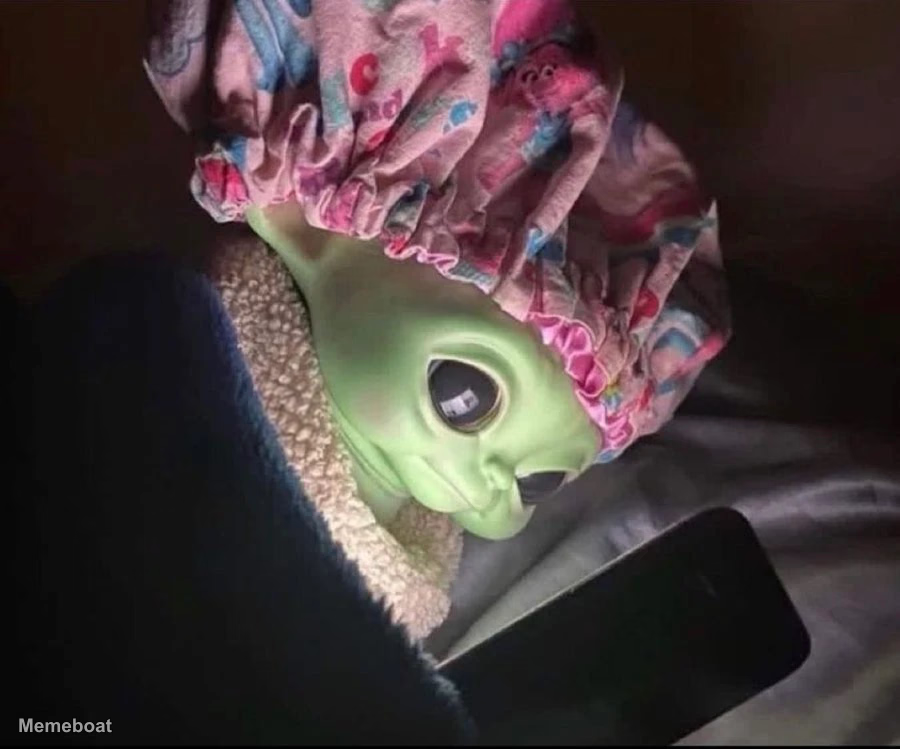
Blank Grogu Looking at Phone meme template
Download the blank Grogu Looking at Phone template to caption it yourself, or add your text right here in the editor above and download the finished meme.
Grogu Looking at Phone template facts
- Dimensions
- 900 × 749 px
- Format
- WEBP
- Text boxes
- 2
- Added
- 2026
About the Grogu Looking at Phone meme template
A Grogu (Baby Yoda) doll is depicted wearing a pink shower cap or bonnet with cartoon characters, possibly from Trolls, printed on it. The doll is nestled in a cozy, light-colored fluffy blanket and appears to be looking down at a dark smartphone, which illuminates its face slightly in a dimly lit setting. The image captures a sense of modern interaction with a beloved character.
Popular Grogu Looking at Phone caption ideas
Remote workers when their mid day nap gets interrupted by a Microsoft Teams notification
Me at 3am:
Me watching the silver chart at 3am:
Templates similar to Grogu Looking at Phone


Grogu Looking at Phone meme FAQ
How do I make a Grogu Looking at Phone meme?
Scroll up to the Grogu Looking at Phone template, type your caption into the 2 text boxes in the editor above, adjust the font, size and color if you like, then click download. Your finished Grogu Looking at Phone meme is ready to share in seconds.
Can I use the Grogu Looking at Phone template for free?
Yes. The Grogu Looking at Phone template is completely free to use — no signup and no limits on how many memes you create or where you share them.
How do I download my Grogu Looking at Phone meme?
Click the download button under the editor once your Grogu Looking at Phone meme looks right. It saves straight to your device as a high-quality PNG or JPEG image.
How do I download the blank Grogu Looking at Phone template?
Use the "Download blank template" button in the blank Grogu Looking at Phone template section above to save the original, un-captioned image — handy if you'd rather caption it in another app or keep a copy.