
Grinch Schedule Meme Generator
Create Your Grinch Schedule Meme
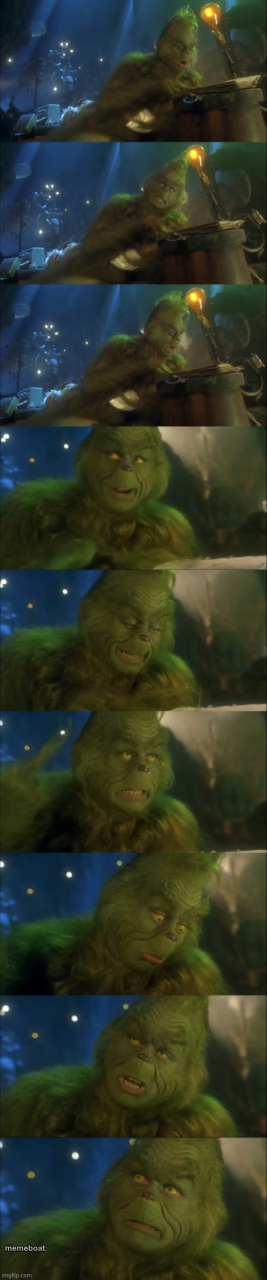
The Grinch's grumpy face repeated across nine panels, ready to be turned into a daily or weekly schedule meme. Caption and download it free.
Blank Grinch Schedule meme template
Download the blank Grinch Schedule template to caption it yourself, or add your text right here in the editor above and download the finished meme.
When to use the Grinch Schedule meme
- Breaking down your work day hour by hour
- Ranking how annoyed you get at each stage of a group project
- The weekly countdown from Monday dread to Friday relief
Grinch Schedule template facts
- Featuring
- The Grinch (How the Grinch Stole Christmas)
- Dimensions
- 267 × 1280 px
- Format
- JPG
- Text boxes
- 9
- Added
- 2025
About the Grinch Schedule meme template
Same scowling Grinch face, nine times in a row. It's the format built for turning your daily grind into a listicle of misery — one panel per hour, per day, per chore, whatever you need to break down into repeating grumpiness.
Works best when each caption escalates: mildly annoyed at 8am, fully unhinged by panel nine. Great for work schedules, gym routines, or the slow decline of your mental state throughout any given Monday.
Popular Grinch Schedule caption ideas
6:30 do school · 7:00 question existence, can't reschedule · 8:00 cause mischief in the class · 11:30 lunch with the boys I can't miss that · 2:30 have a sadness session · 3:50 get home and have a cry · 5:00 eat dinner by myself · 5:10 watch a show I've watched 450 times, looking forward to that · 10:00 cry myself to sleep, IM BOOKED
6am · 7am · 8am · 9am alarm again · 10am coffee #2 · 11am spiraling · 12pm lunch delusion · 1pm regret · 5pm finally free
Monday · Tuesday · Wednesday · Thursday · Friday · Saturday · Sunday · Monday again · send help
Meeting starts · 5 min in · 10 min in · 'quick question' · 20 min in · still going · 'one more thing' · 1 hour in · meeting could've been an email
Templates similar to Grinch Schedule








Grinch Schedule meme FAQ
How do I make a Grinch Schedule meme?
Scroll up to the Grinch Schedule template, type your caption into the 9 text boxes in the editor above, adjust the font, size and color if you like, then click download. Your finished Grinch Schedule meme is ready to share in seconds.
Can I use the Grinch Schedule template for free?
Yes. The Grinch Schedule template is completely free to use — no signup and no limits on how many memes you create or where you share them.
How do I download my Grinch Schedule meme?
Click the download button under the editor once your Grinch Schedule meme looks right. It saves straight to your device as a high-quality PNG or JPEG image.
How do I download the blank Grinch Schedule template?
Use the "Download blank template" button in the blank Grinch Schedule template section above to save the original, un-captioned image — handy if you'd rather caption it in another app or keep a copy.