
Graves Meme Generator
Create Your Graves Meme
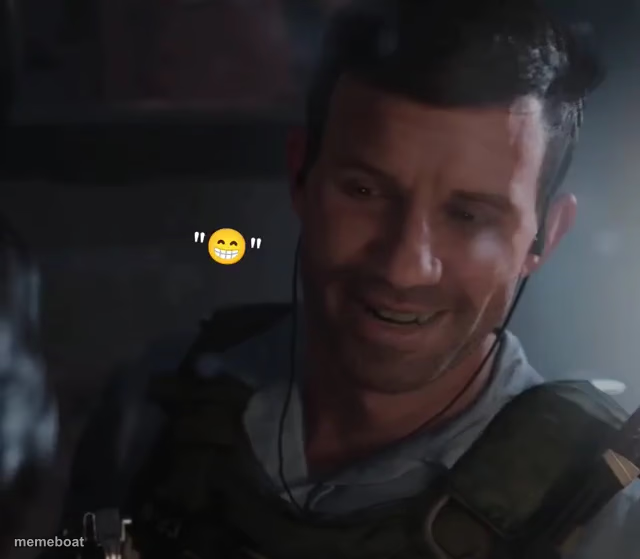
A tactical-vest soldier cracking up mid-scene with a big grinning emoji beside him. Perfect for when something's way funnier than it should be. Caption it free.
Blank Graves meme template
Download the blank Graves template to caption it yourself, or add your text right here in the editor above and download the finished meme.
When to use the Graves meme
- When someone says something inappropriate during a serious briefing
- Trying to keep a straight face and failing during a work meeting
- That one coworker who can't stop laughing at their own joke
Graves template facts
- Dimensions
- 640 × 559 px
- Format
- PNG
- Text boxes
- 2
- Added
- 2025
About the Graves meme template
This one's a soldier in full gear, earpiece in, absolutely losing it laughing while a giant grinning emoji hovers next to his face like a subtitle for his mood. It's the perfect template for that moment when you're supposed to be serious and professional but something just breaks you.
Use it for inside jokes on the job, group chat chaos, or anytime someone cracks up at the worst possible moment. Add your own top and bottom text, download it free, no sign-up required.
Popular Graves caption ideas
WHEN THE SERGEANT SAYS · "THIS IS A SERIOUS SITUATION"
ME TRYING NOT TO LAUGH · DURING THE BRIEFING
HIM: WE NEED TO STAY FOCUSED · ALSO HIM, 2 SECONDS LATER:

Graves meme FAQ
How do I make a Graves meme?
Scroll up to the Graves template, type your caption into the 2 text boxes in the editor above, adjust the font, size and color if you like, then click download. Your finished Graves meme is ready to share in seconds.
Can I use the Graves template for free?
Yes. The Graves template is completely free to use — no signup and no limits on how many memes you create or where you share them.
How do I download my Graves meme?
Click the download button under the editor once your Graves meme looks right. It saves straight to your device as a high-quality PNG or JPEG image.
How do I download the blank Graves template?
Use the "Download blank template" button in the blank Graves template section above to save the original, un-captioned image — handy if you'd rather caption it in another app or keep a copy.