
Google Shopping Meme Generator
Create Your Google Shopping Meme
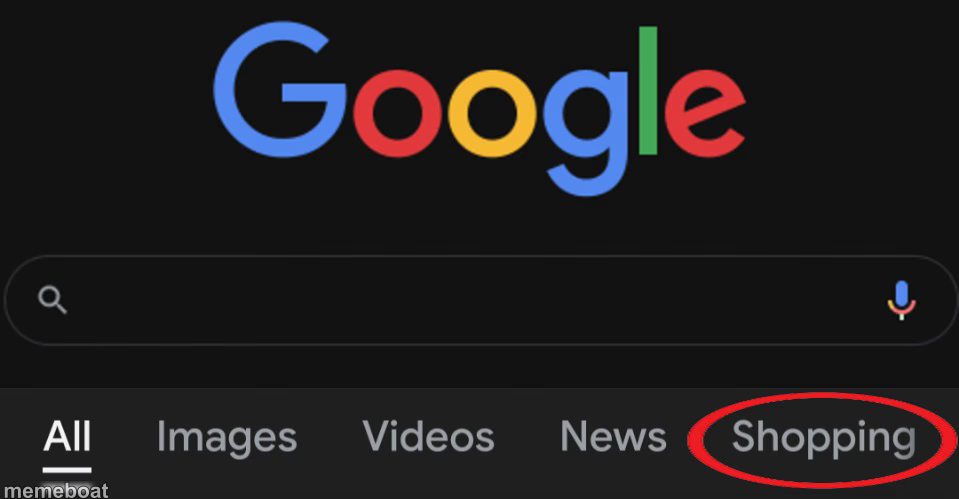
The Google homepage with the 'Shopping' tab circled in red — the classic template for calling out someone's spending habits. Caption it free, no sign-up needed.
Blank Google Shopping meme template
Download the blank Google Shopping template to caption it yourself, or add your text right here in the editor above and download the finished meme.
When to use the Google Shopping meme
- Calling out a friend's third online shopping spree this week
- Confessing your own late-night impulse buys
- Exposing what someone's browser history really looks like
Google Shopping template facts
- Dimensions
- 959 × 499 px
- Format
- JPG
- Text boxes
- 1
- Added
- 2025
About the Google Shopping meme template
Just the Google search bar with one thing highlighted in a bold red circle: Shopping. That's it. That's the whole joke — a quiet callout of exactly what someone's been up to.
Use it whenever you want to gently expose a friend's online shopping addiction, your own impulse buys, or literally any browser tab that says way more about someone than they'd like to admit.
Popular Google Shopping caption ideas
Used Intercontinental Ballistic Missiles
MY BANK ACCOUNT AFTER PAYDAY: EXISTS FOR ONE (1) DAY, THEN THIS
ME: 'I'M NOT BUYING ANYTHING THIS MONTH' — ALSO ME:
WHAT MY GIRLFRIEND SAYS SHE'S DOING VS WHAT SHE'S ACTUALLY DOING
Templates similar to Google Shopping


Google Shopping meme FAQ
How do I make a Google Shopping meme?
Scroll up to the Google Shopping template, type your caption into the text box in the editor above, adjust the font, size and color if you like, then click download. Your finished Google Shopping meme is ready to share in seconds.
Can I use the Google Shopping template for free?
Yes. The Google Shopping template is completely free to use — no signup and no limits on how many memes you create or where you share them.
How do I download my Google Shopping meme?
Click the download button under the editor once your Google Shopping meme looks right. It saves straight to your device as a high-quality PNG or JPEG image.
How do I download the blank Google Shopping template?
Use the "Download blank template" button in the blank Google Shopping template section above to save the original, un-captioned image — handy if you'd rather caption it in another app or keep a copy.