
Goob Meme Generator
Create Your Goob Meme
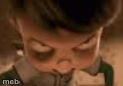
Blurry extreme close-up of a claymation character's eyes and nose, staring intensely — perfect for awkward-moment or side-eye captions. Caption it free.
Blank Goob meme template
Download the blank Goob template to caption it yourself, or add your text right here in the editor above and download the finished meme.
When to use the Goob meme
- When someone says something wildly inappropriate in a work meeting
- That silent stare after your friend says 'trust me, I've got this'
- The face you make internally when small talk goes too long
Goob template facts
- Dimensions
- 123 × 86 px
- Format
- PNG
- Text boxes
- 2
- Added
- 2025
About the Goob meme template
This one is all pupils and nostrils — a stop-motion clay character shoved right up against the lens, mid-stare, like it just heard something it wasn't supposed to. Nobody knows the exact scene, but everybody knows the energy: that frozen, too-close, 'did you really just say that' look.
Use it for the moment someone overshares in a group chat, when a plan quietly falls apart, or any time words fail and only an unsettlingly intense close-up will do. Add your own top and bottom text and download it free, no sign-up required.
Popular Goob caption ideas
when she says 'we need to talk' · internal screaming intensifies
nobody: · me, up close, judging everything
that one coworker explaining crypto again · my soul leaving my body
Templates similar to Goob


Goob meme FAQ
How do I make a Goob meme?
Scroll up to the Goob template, type your caption into the 2 text boxes in the editor above, adjust the font, size and color if you like, then click download. Your finished Goob meme is ready to share in seconds.
Can I use the Goob template for free?
Yes. The Goob template is completely free to use — no signup and no limits on how many memes you create or where you share them.
How do I download my Goob meme?
Click the download button under the editor once your Goob meme looks right. It saves straight to your device as a high-quality PNG or JPEG image.
How do I download the blank Goob template?
Use the "Download blank template" button in the blank Goob template section above to save the original, un-captioned image — handy if you'd rather caption it in another app or keep a copy.