
Gollum Split Personality Meme Generator
Create Your Gollum Split Personality Meme
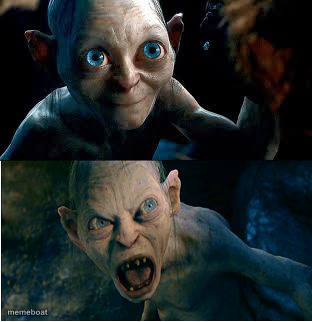
Two-panel template showing the creature's gentle side on top and its snarling angry side below. Perfect for good vs bad decisions or inner conflict jokes. Caption it free and download instantly.
Blank Gollum Split Personality meme template
Download the blank Gollum Split Personality template to caption it yourself, or add your text right here in the editor above and download the finished meme.
When to use the Gollum Split Personality meme
- an inner conflict
- good angel vs bad angel
- hiding your real feelings
- sudden anger
Gollum Split Personality template facts
- Dimensions
- 312 × 322 px
- Format
- JPG
- Text boxes
- 2
- Added
- 2025
About the Gollum Split Personality meme template
The Gollum meme template originates from the iconic character Gollum in the Lord of the Rings film series, first gaining viral traction around 2017 on platforms like Reddit and Twitter. This meme captures Gollum's conflicted personality and obsessive nature, making it a staple in internet culture and meme communities. As a viral phenomenon, the Gollum meme reflects the humor and creativity that define social media’s meme culture, resonating with fans worldwide who enjoy referencing this legendary character in relatable and comedic ways.
Using the Gollum meme template is perfect for expressing inner conflict, obsession, or humorous contradictions in everyday situations. Whether you want to highlight a funny dilemma or poke fun at yourself, this template is ideal for social media content that sparks engagement. Knowing how to use the Gollum meme effectively can boost your posts on Instagram, Twitter, Facebook, or TikTok, especially when timed with trending topics or relatable moments. It’s a versatile meme maker tool for anyone looking to create funny reactions or shareable content that connects with audiences through humor and relatability.
The Gollum meme remains popular due to its instantly recognizable character and the endless customization possibilities it offers. With our easy-to-use online generator, you can create, customize, and personalize your own Gollum memes in seconds—no design skills needed. This meme template is a proven viral content driver, perfect for quick meme creation that encourages social sharing and laughs. Don’t wait—generate your Gollum meme now and join millions who use this #1 meme maker to build trending, funny, and shareable memes effortlessly.
Popular Gollum Split Personality caption ideas
Gollum
THAT MOMENT YOU REALIZE · THAT THE "B" IN "LGBT" MEANS THERE ARE ONLY TWO GENDERS.
Gollum
WHEN YOUR SIBLING · LOOKS AT YOU FROM THE TOP BUNK
Gollum
MMM YES · YOUR TOES ARE MINE
thanks
WHEN YOUR KID MAKES YOU A STICKER COLLAGE · OUT OF FOREVER STAMPS
Gollum
IF RACHEL DOLEZAL CAN "IDENTIFY AS BLACK" I CAN IDENTIFY AS SEXY · GIMME A KISS
Gollum
FORGET MY PRECIOUS · I SMELL BACON
Gollum
DAYLIGHT SAVINGS TIME · WE HATES IT!
Gollum
THE FACE YOU MAKE WHEN YOU REALLY HAVE TO SHIT · BUT SOMEONE KEEPS TALKING TO YOU
Gollum
WHEN YOUR MEME · IS ON THE FRONT PAGE !
Gollum
HOW I LOOK · WHEN A FOREIGNER IS EXPLAINING SOMETHING COMPLICATED BUT HIS ENGLISH IS SHIT
Templates similar to Gollum Split Personality


Gollum Split Personality meme FAQ
How do I make a Gollum Split Personality meme?
Scroll up to the Gollum Split Personality template, type your caption into the 2 text boxes in the editor above, adjust the font, size and color if you like, then click download. Your finished Gollum Split Personality meme is ready to share in seconds.
Can I use the Gollum Split Personality template for free?
Yes. The Gollum Split Personality template is completely free to use — no signup and no limits on how many memes you create or where you share them.
How do I download my Gollum Split Personality meme?
Click the download button under the editor once your Gollum Split Personality meme looks right. It saves straight to your device as a high-quality PNG or JPEG image.
How do I download the blank Gollum Split Personality template?
Use the "Download blank template" button in the blank Gollum Split Personality template section above to save the original, un-captioned image — handy if you'd rather caption it in another app or keep a copy.