
giraffe Meme Generator
Create Your giraffe Meme
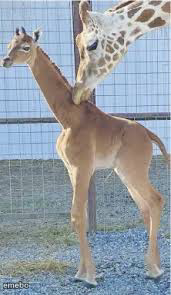
An adult giraffe gently nuzzles a baby giraffe's neck in a tender close moment. Free to caption and download this sweet template on Memeboat.
Blank giraffe meme template
Download the blank giraffe template to caption it yourself, or add your text right here in the editor above and download the finished meme.
When to use the giraffe meme
- Your mom hugging you right before asking about your grades
- A friend being extra nice right before asking for a favor
- Comforting your best friend after a rough breakup
- That one coworker who's suspiciously supportive before layoffs
giraffe template facts
- Dimensions
- 171 × 295 px
- Format
- JPG
- Text boxes
- 1
- Added
- 2025
About the giraffe meme template
Pure, uncomplicated tenderness: a grown giraffe leaning down to nuzzle a baby giraffe's neck, all soft affection and long awkward limbs. It's wholesome in a way that also just barely works for sarcastic captions.
Use it for genuine sweet moments, protective friend or parent energy, or the classic bit where someone acts affectionate right before delivering bad news.
Popular giraffe caption ideas
Me checking on my friend after 'we need to talk'
Mom hugging me right before asking who broke the vase
When bae says 'I love you' then asks to borrow money
Templates similar to giraffe

giraffe meme FAQ
How do I make a giraffe meme?
Scroll up to the giraffe template, type your caption into the text box in the editor above, adjust the font, size and color if you like, then click download. Your finished giraffe meme is ready to share in seconds.
Can I use the giraffe template for free?
Yes. The giraffe template is completely free to use — no signup and no limits on how many memes you create or where you share them.
How do I download my giraffe meme?
Click the download button under the editor once your giraffe meme looks right. It saves straight to your device as a high-quality PNG or JPEG image.
How do I download the blank giraffe template?
Use the "Download blank template" button in the blank giraffe template section above to save the original, un-captioned image — handy if you'd rather caption it in another app or keep a copy.