
Giddy Meme Generator
Create Your Giddy Meme
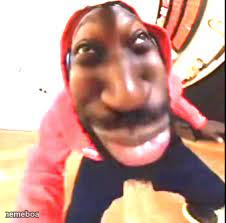
A warped fisheye webcam closeup of a stunned face in a red hoodie. Perfect for reaction memes about shock or disbelief. Caption it free.
Blank Giddy meme template
Download the blank Giddy template to caption it yourself, or add your text right here in the editor above and download the finished meme.
When to use the Giddy meme
- when someone drops a huge secret in the group chat
- your face when you realize you replied-all
Giddy template facts
- Dimensions
- 226 × 223 px
- Format
- PNG
- Text boxes
- 2
- Added
- 2025
About the Giddy meme template
This one is pure chaotic-webcam energy: a face jammed right up against a fisheye lens, features stretched into a wide-eyed, open-mouthed look of total disbelief. It's the kind of grainy, low-fi capture that screams 'did that really just happen' better than words ever could.
Use it whenever a reaction needs to be big, weird, and a little unsettling — plot twists, jump scares, group chat bombshells, or just when someone says something so wild the only response is this face. Drop your caption on and let the distortion do the emotional heavy lifting.
Popular Giddy caption ideas
ME LOOKING AT GODZILLA'S · FEET IN 2014
WAIT · WHAT DID YOU JUST SAY
ME LOOKING AT MY BANK ACCOUNT · AFTER PAYDAY WEEKEND
WHEN THE WIFI · FINALLY COMES BACK ON




Giddy meme FAQ
How do I make a Giddy meme?
Scroll up to the Giddy template, type your caption into the 2 text boxes in the editor above, adjust the font, size and color if you like, then click download. Your finished Giddy meme is ready to share in seconds.
Can I use the Giddy template for free?
Yes. The Giddy template is completely free to use — no signup and no limits on how many memes you create or where you share them.
How do I download my Giddy meme?
Click the download button under the editor once your Giddy meme looks right. It saves straight to your device as a high-quality PNG or JPEG image.
How do I download the blank Giddy template?
Use the "Download blank template" button in the blank Giddy template section above to save the original, un-captioned image — handy if you'd rather caption it in another app or keep a copy.