
Geumsaegi Meme Generator
Create Your Geumsaegi Meme
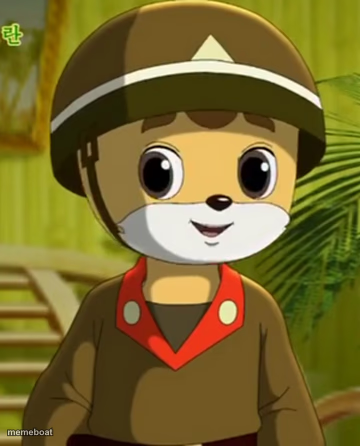
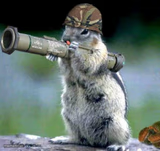
Geumsaegi, the helmeted squirrel spy from Squirrel and Hedgehog, staring blankly ahead. Perfect for deadpan reactions and secret-plan captions. Caption free.
Blank Geumsaegi meme template
Download the blank Geumsaegi template to caption it yourself, or add your text right here in the editor above and download the finished meme.
When to use the Geumsaegi meme
- reacting with zero emotion to an obviously terrible plan
- captioning your own undercover mission that's about to fall apart
- responding to a plot twist you saw coming from a mile away
- the face you make pretending you didn't just get caught
Geumsaegi template facts
- Dimensions
- 360 × 446 px
- Format
- PNG
- Text boxes
- 2
- Added
- 2025
About the Geumsaegi meme template
Meet Geumsaegi, the deadpan hero-squirrel spy from North Korea's most famous cartoon export, Squirrel and Hedgehog. That helmet has seen things. That stare says he's already three steps ahead of the weasels, or possibly just spaced out mid-mission briefing.
Whether you're mocking someone's overconfident undercover plan, reacting to a plot twist nobody saw coming, or just need a blank, unbothered face for your next caption, Geumsaegi delivers. Type your text, download, and go be a secret agent about it.
Popular Geumsaegi caption ideas
Told them the plan was solid. · It was not solid.
When you're the mole · and nobody suspects a thing.
My poker face · during the group project blame game.



Geumsaegi meme FAQ
How do I make a Geumsaegi meme?
Scroll up to the Geumsaegi template, type your caption into the 2 text boxes in the editor above, adjust the font, size and color if you like, then click download. Your finished Geumsaegi meme is ready to share in seconds.
Can I use the Geumsaegi template for free?
Yes. The Geumsaegi template is completely free to use — no signup and no limits on how many memes you create or where you share them.
How do I download my Geumsaegi meme?
Click the download button under the editor once your Geumsaegi meme looks right. It saves straight to your device as a high-quality PNG or JPEG image.
How do I download the blank Geumsaegi template?
Use the "Download blank template" button in the blank Geumsaegi template section above to save the original, un-captioned image — handy if you'd rather caption it in another app or keep a copy.