
Get help Meme Generator
Create Your Get help Meme
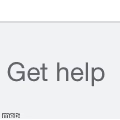
A plain gray screen with the words 'Get help' — the most deadpan, minimalist template around. Drop your own text over it and download free.
Blank Get help meme template
Download the blank Get help template to caption it yourself, or add your text right here in the editor above and download the finished meme.
When to use the Get help meme
- Responding to a friend's questionable life choice with blunt advice
- Captioning a screenshot of someone's unhinged text message
- Making a minimalist joke that needs zero visual noise
- Replying to any group chat drama with deadpan honesty
Get help template facts
- Dimensions
- 120 × 120 px
- Format
- JPG
- Text boxes
- 1
- Added
- 2025
About the Get help meme template
Just a blank gray box with 'Get help' sitting there in plain text, like a system message that's judging you personally. There's no context, no drama, just brutal simplicity, which somehow makes it funnier.
Use it as a blunt, out-of-nowhere punchline template, or swap the words for your own deadpan advice to a friend who clearly needs it.
Popular Get help caption ideas
Get help
Get a therapist
Get a hobby



Get help meme FAQ
How do I make a Get help meme?
Scroll up to the Get help template, type your caption into the text box in the editor above, adjust the font, size and color if you like, then click download. Your finished Get help meme is ready to share in seconds.
Can I use the Get help template for free?
Yes. The Get help template is completely free to use — no signup and no limits on how many memes you create or where you share them.
How do I download my Get help meme?
Click the download button under the editor once your Get help meme looks right. It saves straight to your device as a high-quality PNG or JPEG image.
How do I download the blank Get help template?
Use the "Download blank template" button in the blank Get help template section above to save the original, un-captioned image — handy if you'd rather caption it in another app or keep a copy.