
Gay Men Meme Generator
Create Your Gay Men Meme
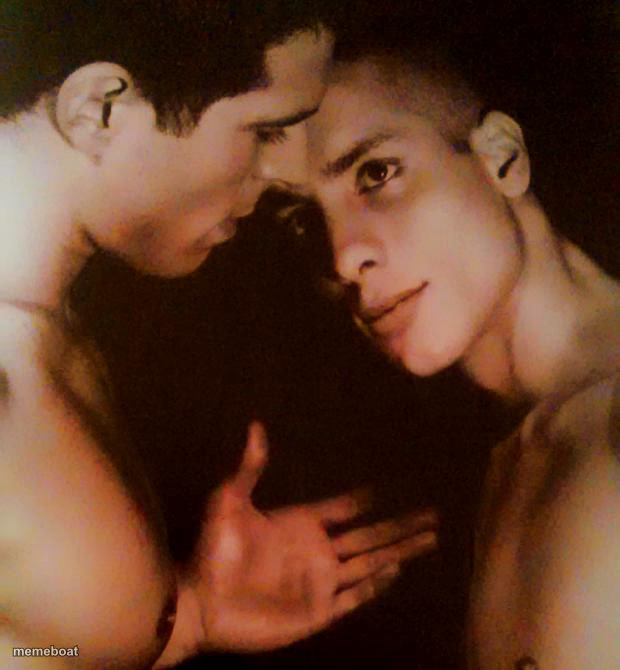
Two shirtless guys in an intimate close whisper — perfect for secrets, gossip, or 'bro I gotta tell you something' captions. Caption free & download.
Blank Gay Men meme template
Download the blank Gay Men template to caption it yourself, or add your text right here in the editor above and download the finished meme.
When to use the Gay Men meme
- When your friend leans in to tell you gossip that's clearly not true
- Whispering the plan right before it goes horribly wrong
- That one coworker sharing 'confidential' office drama
Gay Men template facts
- Dimensions
- 620 × 670 px
- Format
- JPG
- Text boxes
- 2
- Added
- 2025
About the Gay Men meme template
This one's all mood: two shirtless guys pressed cheek to cheek in near-darkness, one leaning in like he's about to drop the juiciest secret of the year. No context, no backstory, just pure dramatic-whisper energy that your caption gets to invent.
Use it for gossip, secrets, plot twists, or that one friend who always has 'tea' nobody asked for. The lighting alone does half the joke for you.
Popular Gay Men caption ideas
Bro I gotta tell you something · Please tell me it's not about rent
Psst... nobody can know · It's already on the group chat
The secret ingredient is · we have no idea what we're doing
Templates similar to Gay Men

Gay Men meme FAQ
How do I make a Gay Men meme?
Scroll up to the Gay Men template, type your caption into the 2 text boxes in the editor above, adjust the font, size and color if you like, then click download. Your finished Gay Men meme is ready to share in seconds.
Can I use the Gay Men template for free?
Yes. The Gay Men template is completely free to use — no signup and no limits on how many memes you create or where you share them.
How do I download my Gay Men meme?
Click the download button under the editor once your Gay Men meme looks right. It saves straight to your device as a high-quality PNG or JPEG image.
How do I download the blank Gay Men template?
Use the "Download blank template" button in the blank Gay Men template section above to save the original, un-captioned image — handy if you'd rather caption it in another app or keep a copy.