
Frisk 2 Panel Meme Generator
Create Your Frisk 2 Panel Meme
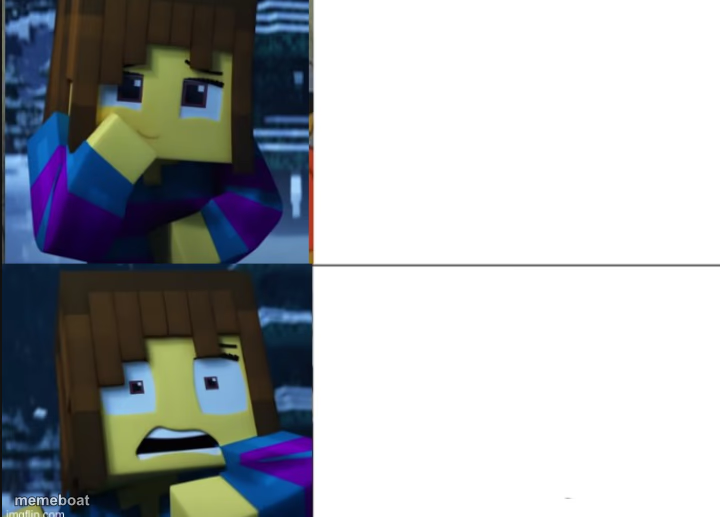
Blocky Minecraft-style character calmly thinking on top, then shocked and screaming below. Perfect for a calm-to-chaos reaction. Caption it free.
Blank Frisk 2 Panel meme template
Download the blank Frisk 2 Panel template to caption it yourself, or add your text right here in the editor above and download the finished meme.
When to use the Frisk 2 Panel meme
- Reading the first line of an email, then reading the second line
- Checking your bank account before payday vs. after
- Hearing a normal question, then hearing the follow-up question
- Opening your report card top half vs bottom half
Frisk 2 Panel template facts
- Dimensions
- 720 × 517 px
- Format
- PNG
- Text boxes
- 2
- Added
- 2025
About the Frisk 2 Panel meme template
One second you're calm, cool, and thinking it over. The next second reality hits and you're screaming into the void. This two-panel template features a Frisk-style Minecraft character going from composed to completely losing it, which makes it a natural fit for any before-and-after reaction where things go sideways fast.
Whether you're capturing the moment plans fall apart, a plot twist nobody saw coming, or just the emotional whiplash of everyday life, this format nails the escalation. Drop your own text in both panels and let the contrast do the comedic heavy lifting.
Popular Frisk 2 Panel caption ideas
YOU MAKE YOUR "FUNNIEST" MEME · AND NOBODY HAS VOTED OR COMMENTED ON IT
me before checking my grades · me after checking my grades
"it's probably fine" · IT WAS NOT FINE
waiting for the test results · seeing the test results
Templates similar to Frisk 2 Panel





Frisk 2 Panel meme FAQ
How do I make a Frisk 2 Panel meme?
Scroll up to the Frisk 2 Panel template, type your caption into the 2 text boxes in the editor above, adjust the font, size and color if you like, then click download. Your finished Frisk 2 Panel meme is ready to share in seconds.
Can I use the Frisk 2 Panel template for free?
Yes. The Frisk 2 Panel template is completely free to use — no signup and no limits on how many memes you create or where you share them.
How do I download my Frisk 2 Panel meme?
Click the download button under the editor once your Frisk 2 Panel meme looks right. It saves straight to your device as a high-quality PNG or JPEG image.
How do I download the blank Frisk 2 Panel template?
Use the "Download blank template" button in the blank Frisk 2 Panel template section above to save the original, un-captioned image — handy if you'd rather caption it in another app or keep a copy.