
Frieren smug Meme Generator
Create Your Frieren smug Meme

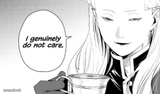
Frieren giving a knowing, quietly smug little smile. Perfect for 'I already knew that' moments. Caption and download this template free.
Blank Frieren smug meme template
Download the blank Frieren smug template to caption it yourself, or add your text right here in the editor above and download the finished meme.
When to use the Frieren smug meme
- Calling the plot twist before it happens
- Watching your prediction come true in real time
- When you were right and everyone doubted you
- Ancient wisdom vibes after outliving the drama
Frieren smug template facts
- Featuring
- Frieren (Frieren: Beyond Journey's End)
- Dimensions
- 401 × 361 px
- Format
- PNG
- Text boxes
- 1
- Added
- 2025
About the Frieren smug meme template
That soft, closed-eyes smirk Frieren gets when she's clearly two steps ahead of everyone else in the room — the elf mage who's lived a thousand years and has seen this exact situation play out before, so nothing rattles her.
This face is built for quiet superiority jokes: knowing something before it's announced, watching a plan you predicted unfold exactly as expected, or just radiating calm smugness while chaos happens around you.
Popular Frieren smug caption ideas
Me after calling the ending in episode 1
When you've survived 1000 years of this exact argument
"I told you so" but make it elegant
Templates similar to Frieren smug






Frieren smug meme FAQ
How do I make a Frieren smug meme?
Scroll up to the Frieren smug template, type your caption into the text box in the editor above, adjust the font, size and color if you like, then click download. Your finished Frieren smug meme is ready to share in seconds.
Can I use the Frieren smug template for free?
Yes. The Frieren smug template is completely free to use — no signup and no limits on how many memes you create or where you share them.
How do I download my Frieren smug meme?
Click the download button under the editor once your Frieren smug meme looks right. It saves straight to your device as a high-quality PNG or JPEG image.
How do I download the blank Frieren smug template?
Use the "Download blank template" button in the blank Frieren smug template section above to save the original, un-captioned image — handy if you'd rather caption it in another app or keep a copy.