
fork Meme Generator
Create Your fork Meme

A plain silver dinner fork on a dark background, a blank slate for absurdist object humor and deadpan 'me vs' captions. Free to caption and download.
Blank fork meme template
Download the blank fork template to caption it yourself, or add your text right here in the editor above and download the finished meme.
When to use the fork meme
- Random household object standing in for something completely unrelated
- The 'me choosing violence' absurdist caption format
- Anticlimactic reveal after a big dramatic buildup
- Deadpan commentary on something that doesn't deserve this much attention
fork template facts
- Dimensions
- 557 × 429 px
- Format
- JPG
- Text boxes
- 1
- Added
- 2025
About the fork meme template
Just a fork. A perfectly ordinary, slightly worn silver dinner fork lying diagonally on black. No context, no drama, no reason it's a meme, which is exactly why it works as one.
It's the ideal blank canvas for absurdist juxtaposition: put something huge and dramatic in the caption next to this utterly mundane object and let the mismatch do the joke for you.
Popular fork caption ideas
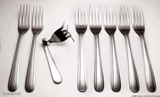
TWO FORKS ARE BETTER THEN · ONE
me choosing violence today
the one thing standing between me and total chaos
my will to live vs a Monday morning





fork meme FAQ
How do I make a fork meme?
Scroll up to the fork template, type your caption into the text box in the editor above, adjust the font, size and color if you like, then click download. Your finished fork meme is ready to share in seconds.
Can I use the fork template for free?
Yes. The fork template is completely free to use — no signup and no limits on how many memes you create or where you share them.
How do I download my fork meme?
Click the download button under the editor once your fork meme looks right. It saves straight to your device as a high-quality PNG or JPEG image.
How do I download the blank fork template?
Use the "Download blank template" button in the blank fork template section above to save the original, un-captioned image — handy if you'd rather caption it in another app or keep a copy.