
Fat momma Meme Generator
Create Your Fat momma Meme
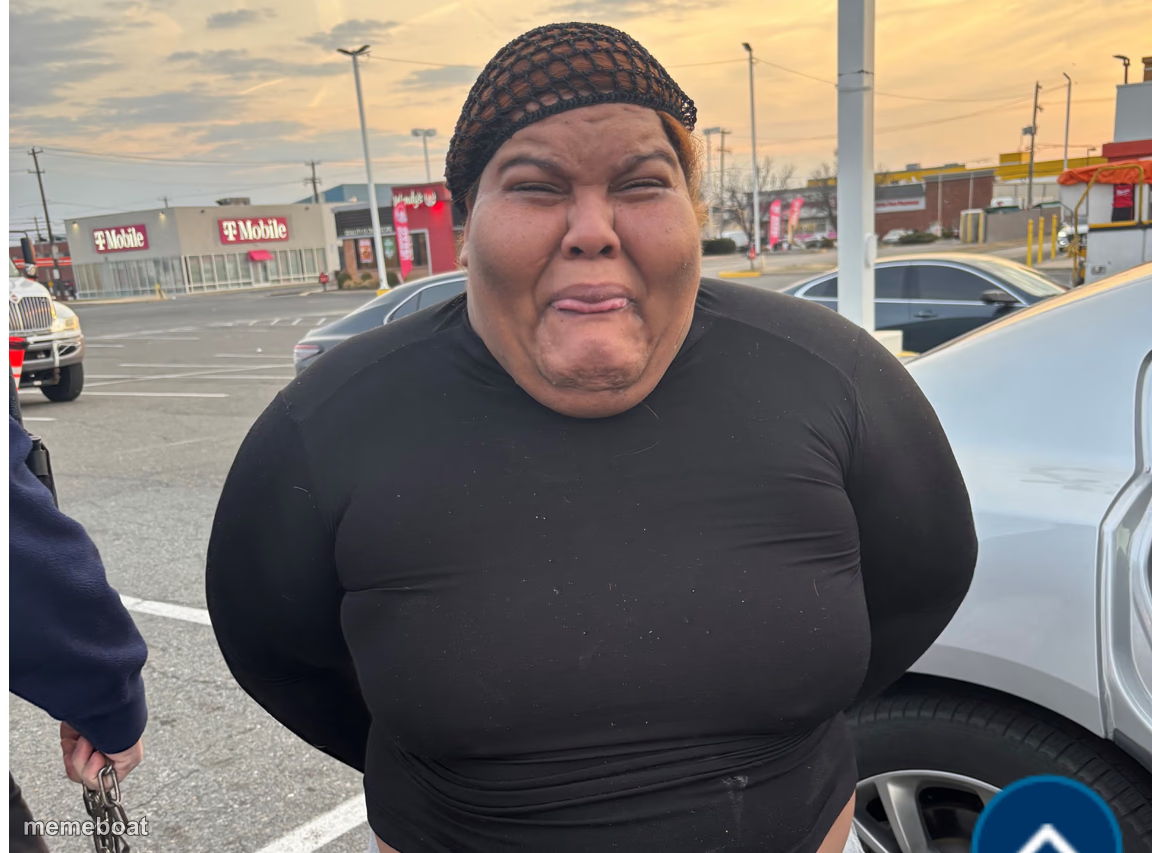
A woman scrunching her face in pure disgust in a busy parking lot — the perfect reaction shot for 'absolutely not.' Caption it free right now.
Blank Fat momma meme template
Download the blank Fat momma template to caption it yourself, or add your text right here in the editor above and download the finished meme.
When to use the Fat momma meme
- Smelling the office fridge on a Monday
- Hearing your ex got engaged
- Being told the meeting could've been an email but happened anyway
Fat momma template facts
- Dimensions
- 1152 × 853 px
- Format
- JPG
- Text boxes
- 2
- Added
- 2025
About the Fat momma meme template
Nose scrunched, lips pursed, the exact face you make when someone suggests something so bad you can't even form words yet. She's standing in a parking lot but the energy is universal — total, immediate, visible disgust.
Use it for reacting to bad ideas, worse smells, and the group chat suggestion nobody asked for. It's the visual version of 'I'm sorry, what?'
Popular Fat momma caption ideas
When they say 'let's just split it evenly' · and you ordered water
Me reading the group project 'plan' · written entirely in Comic Sans
When someone says they 'don't believe in seasoning' · in this economy
Templates similar to Fat momma


Fat momma meme FAQ
How do I make a Fat momma meme?
Scroll up to the Fat momma template, type your caption into the 2 text boxes in the editor above, adjust the font, size and color if you like, then click download. Your finished Fat momma meme is ready to share in seconds.
Can I use the Fat momma template for free?
Yes. The Fat momma template is completely free to use — no signup and no limits on how many memes you create or where you share them.
How do I download my Fat momma meme?
Click the download button under the editor once your Fat momma meme looks right. It saves straight to your device as a high-quality PNG or JPEG image.
How do I download the blank Fat momma template?
Use the "Download blank template" button in the blank Fat momma template section above to save the original, un-captioned image — handy if you'd rather caption it in another app or keep a copy.