
Excited Andy Meme Generator
Create Your Excited Andy Meme
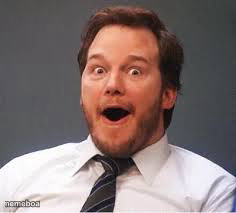
Chris Pratt's jaw-drop shocked face, perfect for plot twists and unbelievable news. Caption this free reaction meme and download instantly.
Blank Excited Andy meme template
Download the blank Excited Andy template to caption it yourself, or add your text right here in the editor above and download the finished meme.
When to use the Excited Andy meme
- Opening your phone bill after the free trial ended
- Finding out the group project partner did nothing
- Seeing the final boss appear when you thought the game was over
Excited Andy template facts
- Featuring
- Chris Pratt (reaction photo)
- Dimensions
- 236 × 213 px
- Format
- JPG
- Text boxes
- 1
- Added
- 2025
About the Excited Andy meme template
Wide eyes, open mouth, full-on disbelief. This is the face for when something so wild happens you can't even process it in real time.
Great for plot twists, surprise bills, unexpected texts, or reacting to news that changes everything. One of those universally readable shocked faces that works for literally any punchline.
Popular Excited Andy caption ideas
When you check your bank app on a Tuesday
Me realizing I replied all
When the WiFi password actually works first try
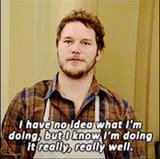
Templates similar to Excited Andy






Excited Andy meme FAQ
How do I make a Excited Andy meme?
Scroll up to the Excited Andy template, type your caption into the text box in the editor above, adjust the font, size and color if you like, then click download. Your finished Excited Andy meme is ready to share in seconds.
Can I use the Excited Andy template for free?
Yes. The Excited Andy template is completely free to use — no signup and no limits on how many memes you create or where you share them.
How do I download my Excited Andy meme?
Click the download button under the editor once your Excited Andy meme looks right. It saves straight to your device as a high-quality PNG or JPEG image.
How do I download the blank Excited Andy template?
Use the "Download blank template" button in the blank Excited Andy template section above to save the original, un-captioned image — handy if you'd rather caption it in another app or keep a copy.