
Evil Spotify Meme Generator
Create Your Evil Spotify Meme
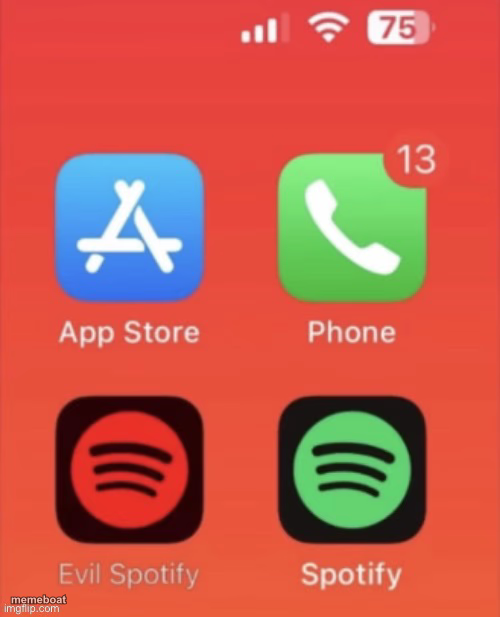
A phone home screen with a sinister black-and-red twin sitting next to the real Spotify app — the go-to template for a good app's evil doppelganger. Caption free.
Blank Evil Spotify meme template
Download the blank Evil Spotify template to caption it yourself, or add your text right here in the editor above and download the finished meme.
When to use the Evil Spotify meme
- The version of an app after a bad redesign
- Your productive self vs. your 3am doomscrolling self
- The playlist algorithm that only recommends songs you hate
- Comparing a free app to its ad-riddled premium trap
Evil Spotify template facts
- Dimensions
- 500 × 617 px
- Format
- JPG
- Added
- 2025
About the Evil Spotify meme template
Two Spotify icons, one green and friendly, one black and blood-red like it's about to leak your Discover Weekly to the void. This is the format for every app that has a secret evil version living rent-free in your head.
Swap the labels for whatever duality you're dealing with — good habit vs. bad habit, weekday you vs. weekend you, the version of the app before an update ruined everything. The joke writes itself once you name the villain.
Evil Spotify meme FAQ
How do I make a Evil Spotify meme?
Scroll up to the Evil Spotify template, add your own text boxes in the editor above and type your captions, adjust the font, size and color if you like, then click download. Your finished Evil Spotify meme is ready to share in seconds.
Can I use the Evil Spotify template for free?
Yes. The Evil Spotify template is completely free to use — no signup and no limits on how many memes you create or where you share them.
How do I download my Evil Spotify meme?
Click the download button under the editor once your Evil Spotify meme looks right. It saves straight to your device as a high-quality PNG or JPEG image.
How do I download the blank Evil Spotify template?
Use the "Download blank template" button in the blank Evil Spotify template section above to save the original, un-captioned image — handy if you'd rather caption it in another app or keep a copy.