
Duolingo Notification Meme Generator
Create Your Duolingo Notification Meme
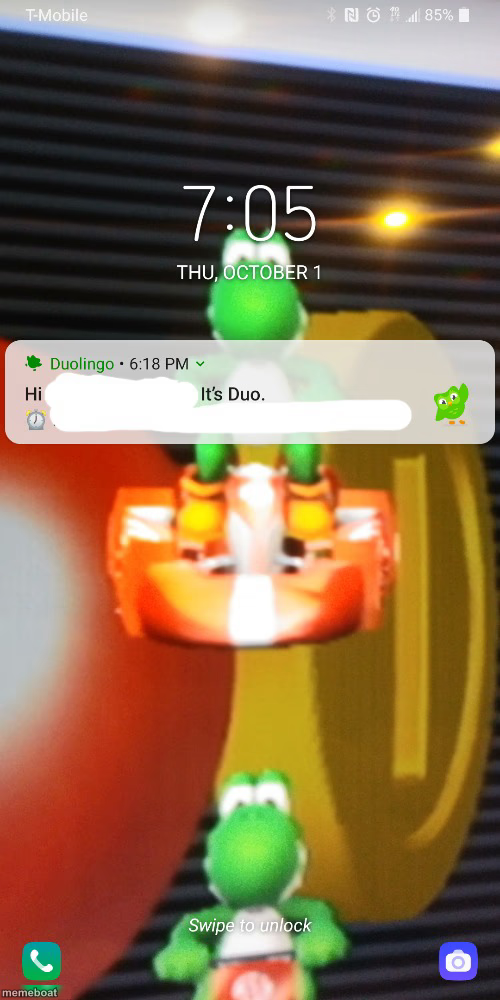
A lock screen notification from Duolingo saying 'Hi ___ It's Duo' over a Mario Kart Yoshi wallpaper. Free to caption and download.
Blank Duolingo Notification meme template
Download the blank Duolingo Notification template to caption it yourself, or add your text right here in the editor above and download the finished meme.
When to use the Duolingo Notification meme
- Duolingo streak-shame jokes
- Any app notification that feels like a personal guilt trip
- Pretending an app is stalking your life choices
- Reacting to being 'checked in on' by software
Duolingo Notification template facts
- Featuring
- Duolingo Owl (Duo) (Duolingo)
- Dimensions
- 500 × 1000 px
- Format
- JPG
- Text boxes
- 2
- Added
- 2025
About the Duolingo Notification meme template
That familiar dread of a Duolingo notification popping up on your lock screen — 'Hi [blank], it's Duo' — like the app itself is personally checking in on your broken streak. This one's got a Mario Kart Yoshi wallpaper underneath for extra chaotic phone-screen energy.
Great for streak-shame jokes, guilt-trip notifications, or any 'the app is now a person and it's disappointed in me' bit. Swap the blank for whatever your Duo (or any app) would actually text you.
Popular Duolingo Notification caption ideas
friend · I am right out side your house. better protect yourself. hehe
Duolingo • 6:18 PM · "we noticed you said 'I'll do it tomorrow' 47 times"
Duolingo • 6:18 PM · "your streak isn't the only thing dying"
Duolingo • 6:18 PM · "do you even remember what language you're learning"
Templates similar to Duolingo Notification




Duolingo Notification meme FAQ
How do I make a Duolingo Notification meme?
Scroll up to the Duolingo Notification template, type your caption into the 2 text boxes in the editor above, adjust the font, size and color if you like, then click download. Your finished Duolingo Notification meme is ready to share in seconds.
Can I use the Duolingo Notification template for free?
Yes. The Duolingo Notification template is completely free to use — no signup and no limits on how many memes you create or where you share them.
How do I download my Duolingo Notification meme?
Click the download button under the editor once your Duolingo Notification meme looks right. It saves straight to your device as a high-quality PNG or JPEG image.
How do I download the blank Duolingo Notification template?
Use the "Download blank template" button in the blank Duolingo Notification template section above to save the original, un-captioned image — handy if you'd rather caption it in another app or keep a copy.