
Scrooge McDuck Shushing Meme Generator
Create Your Scrooge McDuck Shushing Meme
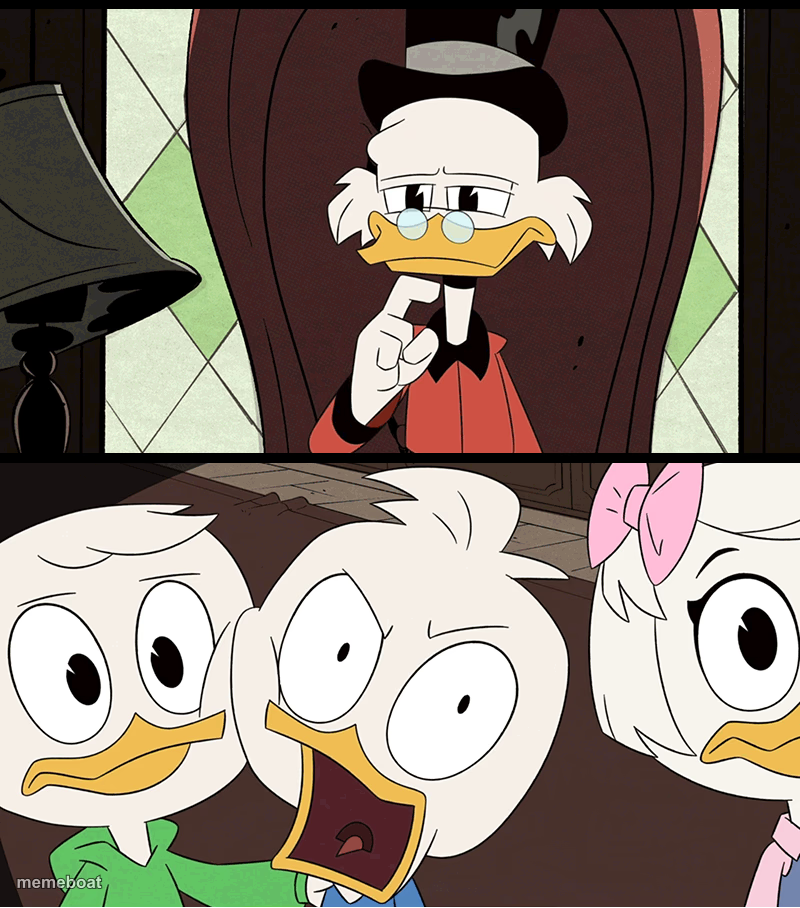
Scrooge McDuck shushing on top, Huey Dewey and Louie shocked below — the DuckTales reaction combo for secrets and plot twists. Caption it free.
Blank Scrooge McDuck Shushing meme template
Download the blank Scrooge McDuck Shushing template to caption it yourself, or add your text right here in the editor above and download the finished meme.
When to use the Scrooge McDuck Shushing meme
- Someone says 'don't tell anyone' and then everyone finds out immediately
- A calm warning followed by everyone panicking anyway
- Revealing family secrets that ruin the whole group chat
Scrooge McDuck Shushing template facts
- Featuring
- Scrooge McDuck (DuckTales)
- Dimensions
- 800 × 908 px
- Format
- PNG
- Added
- 2025
About the Scrooge McDuck Shushing meme template
Scrooge McDuck holds up a finger for silence while three little ducklings absolutely lose it in the next panel. It's the DuckTales version of 'wait, WHAT.'
Great for secrets that get revealed the second someone says 'shh,' family drama, or any two-panel setup where calm instructions get met with pure chaos.
Templates similar to Scrooge McDuck Shushing

Scrooge McDuck Shushing meme FAQ
How do I make a Scrooge McDuck Shushing meme?
Scroll up to the Scrooge McDuck Shushing template, add your own text boxes in the editor above and type your captions, adjust the font, size and color if you like, then click download. Your finished Scrooge McDuck Shushing meme is ready to share in seconds.
Can I use the Scrooge McDuck Shushing template for free?
Yes. The Scrooge McDuck Shushing template is completely free to use — no signup and no limits on how many memes you create or where you share them.
How do I download my Scrooge McDuck Shushing meme?
Click the download button under the editor once your Scrooge McDuck Shushing meme looks right. It saves straight to your device as a high-quality PNG or JPEG image.
How do I download the blank Scrooge McDuck Shushing template?
Use the "Download blank template" button in the blank Scrooge McDuck Shushing template section above to save the original, un-captioned image — handy if you'd rather caption it in another app or keep a copy.