
Dragon Ball Z thumbs up Video Meme Generator
Create Your Dragon Ball Z thumbs up Meme
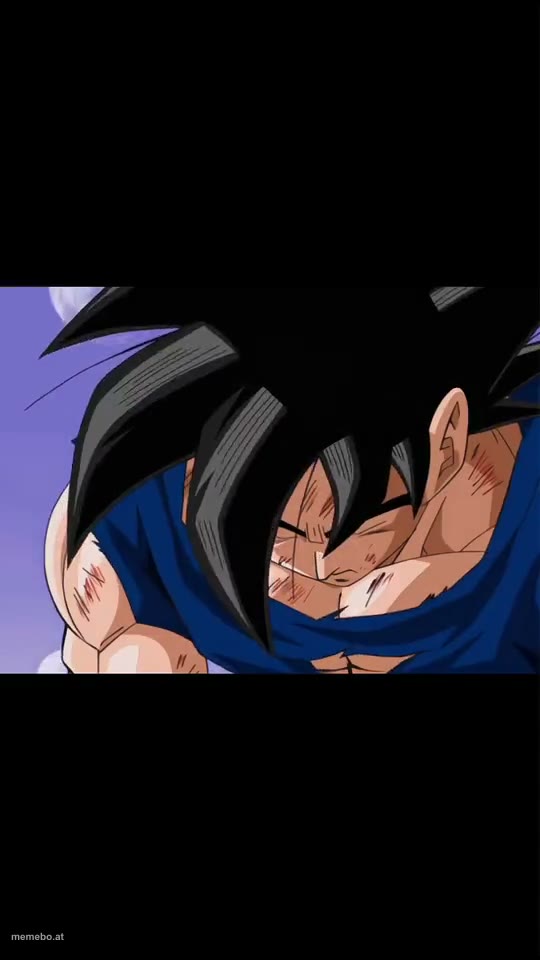
Also known as: Goku Thumbs Up · Vegeta Thumbs Up · Goku and Vegeta Thumbs Up
The video shows a sequence from Dragon Ball Z. Initially, a close-up of Goku, battered but smiling and giving a thumbs-up.
Blank Dragon Ball Z thumbs up meme template
Download the blank Dragon Ball Z thumbs up clip to caption it yourself, or add your text right here in the editor above and save the finished meme.
Dragon Ball Z thumbs up template facts
- Dimensions
- 540 × 960 px
- Format
- MP4
- Text boxes
- 2
- Added
- 2026
About the Dragon Ball Z thumbs up meme template
The video shows a sequence from Dragon Ball Z. Initially, a close-up of Goku, battered but smiling and giving a thumbs-up. This transitions to Vegeta, also injured and lying on the ground, slowly looking up and giving a thumbs-up. The final shot is a wider view showing Vegeta on the ground, Goku standing, and another character in the background, all set against a landscape with mountains and two moons, reinforcing a scene of camaraderie or respect after a battle.
More meme templates



Dragon Ball Z thumbs up meme FAQ
How do I make a Dragon Ball Z thumbs up meme?
Scroll up to the Dragon Ball Z thumbs up clip, type your caption into the 2 text boxes in the editor above, adjust the font, size and color if you like, then save it as a GIF or MP4. Your finished Dragon Ball Z thumbs up meme is ready to share in seconds.
Can I use the Dragon Ball Z thumbs up template for free?
Yes. The Dragon Ball Z thumbs up template is completely free to use — no signup and no limits on how many memes you create or where you share them.
How do I download my Dragon Ball Z thumbs up meme?
Click the download button under the editor once your Dragon Ball Z thumbs up meme looks right. It saves to your device as a GIF of up to 10 seconds, or as an MP4 video in browsers that can make one.
How do I download the blank Dragon Ball Z thumbs up template?
Use the "Download blank template" button in the blank Dragon Ball Z thumbs up template section above to save the original clip as an MP4, without captions.