
Doll plush Meme Generator
Create Your Doll plush Meme
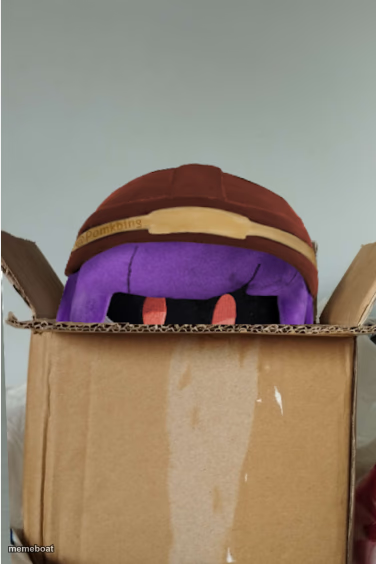
A purple plush toy in a red helmet peeks out of a cardboard shipping box. Perfect for unboxing jokes and 'surprise arrival' captions. Free to caption and download.
Blank Doll plush meme template
Download the blank Doll plush template to caption it yourself, or add your text right here in the editor above and download the finished meme.
When to use the Doll plush meme
- Ordering one thing online and getting something questionable in return
- Your emotional support item arriving three weeks late
- First day of a new job energy captured in a single stare
- Reacting to opening a mystery box or care package
Doll plush template facts
- Dimensions
- 376 × 564 px
- Format
- PNG
- Added
- 2025
About the Doll plush meme template
Something purple and vaguely alarmed is staring out of a cardboard box, helmet slightly askew, like it just got shipped somewhere it didn't want to go. There's a real 'day one on the job' energy to it, equal parts confused and ready to fight.
Use it for online-order reveals, first-day-at-work dread, or anything where the punchline is 'this is not what I expected to find in this box.' Great for e-commerce jokes, cosplay unboxings, or captioning your own emotional state on a Monday.
Templates similar to Doll plush

Doll plush meme FAQ
How do I make a Doll plush meme?
Scroll up to the Doll plush template, add your own text boxes in the editor above and type your captions, adjust the font, size and color if you like, then click download. Your finished Doll plush meme is ready to share in seconds.
Can I use the Doll plush template for free?
Yes. The Doll plush template is completely free to use — no signup and no limits on how many memes you create or where you share them.
How do I download my Doll plush meme?
Click the download button under the editor once your Doll plush meme looks right. It saves straight to your device as a high-quality PNG or JPEG image.
How do I download the blank Doll plush template?
Use the "Download blank template" button in the blank Doll plush template section above to save the original, un-captioned image — handy if you'd rather caption it in another app or keep a copy.