
Dobby has no Master Meme Generator
Create Your Dobby has no Master Meme
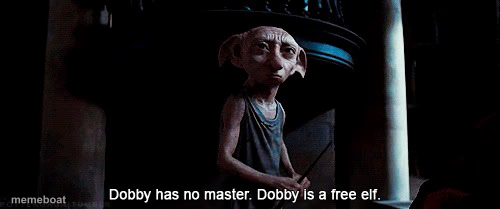
Dobby declaring 'Dobby has no master, Dobby is a free elf' — the ultimate quitting-your-job, cutting-ties freedom caption. Caption and download free.
Blank Dobby has no Master meme template
Download the blank Dobby has no Master template to caption it yourself, or add your text right here in the editor above and download the finished meme.
When to use the Dobby has no Master meme
- Quitting a job you hated
- Finally leaving a group chat that stressed you out
- Canceling a subscription you forgot you had
- Escaping a toxic friendship or situationship
Dobby has no Master template facts
- Featuring
- Dobby (Harry Potter)
- Dimensions
- 500 × 209 px
- Format
- JPG
- Added
- 2025
About the Dobby has no Master meme template
Dobby standing proud in the shadows, finally free after Harry tricks Lucius Malfoy into freeing him with a sock. It's one of cinema's most satisfying liberation moments, and the internet turned it into the go-to caption for cutting loose.
Use it for quitting a toxic job, ghosting a group chat, canceling a subscription, or any moment you declare independence from something that's been controlling you.
Templates similar to Dobby has no Master

Dobby has no Master meme FAQ
How do I make a Dobby has no Master meme?
Scroll up to the Dobby has no Master template, add your own text boxes in the editor above and type your captions, adjust the font, size and color if you like, then click download. Your finished Dobby has no Master meme is ready to share in seconds.
Can I use the Dobby has no Master template for free?
Yes. The Dobby has no Master template is completely free to use — no signup and no limits on how many memes you create or where you share them.
How do I download my Dobby has no Master meme?
Click the download button under the editor once your Dobby has no Master meme looks right. It saves straight to your device as a high-quality PNG or JPEG image.
How do I download the blank Dobby has no Master template?
Use the "Download blank template" button in the blank Dobby has no Master template section above to save the original, un-captioned image — handy if you'd rather caption it in another app or keep a copy.