
Dismayed Duke Meme Generator
Create Your Dismayed Duke Meme
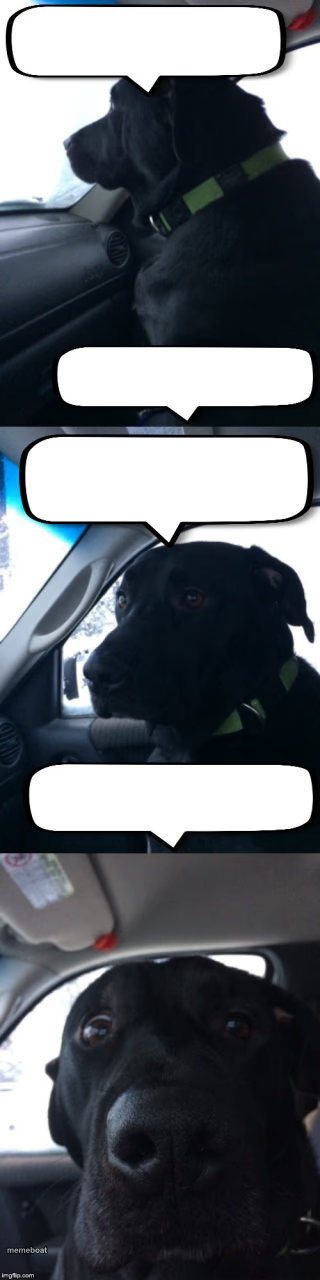
A black lab riding in the car with four speech-bubble panels, giving a slow reaction spiral. Great for escalating confessions or bad news. Free to edit.
Blank Dismayed Duke meme template
Download the blank Dismayed Duke template to caption it yourself, or add your text right here in the editor above and download the finished meme.
When to use the Dismayed Duke meme
- Confessing something in stages to soften the blow
- A conversation that escalates from mild to unhinged
- Explaining a bad decision one step at a time
- The slow realization that you're the problem
Dismayed Duke template facts
- Dimensions
- 320 × 1280 px
- Format
- JPG
- Text boxes
- 4
- Added
- 2025
About the Dismayed Duke meme template
Four panels, one very expressive black dog in a car seat, and a whole lot of room for dialogue. The dog goes from neutral to increasingly done-with-this-conversation, which makes it perfect for a slow-burn confession or a story that gets worse with every line.
Popular Dismayed Duke caption ideas
So I did something · It's not that bad · Okay it's kind of bad · I ate your leftovers
Me: I only have one drink · Also me: · Two hours later: · Who let me near the bar tab
Boss: quick question · Me: sure · Boss: why is production down · Me: define 'down'
Templates similar to Dismayed Duke



Dismayed Duke meme FAQ
How do I make a Dismayed Duke meme?
Scroll up to the Dismayed Duke template, type your caption into the 4 text boxes in the editor above, adjust the font, size and color if you like, then click download. Your finished Dismayed Duke meme is ready to share in seconds.
Can I use the Dismayed Duke template for free?
Yes. The Dismayed Duke template is completely free to use — no signup and no limits on how many memes you create or where you share them.
How do I download my Dismayed Duke meme?
Click the download button under the editor once your Dismayed Duke meme looks right. It saves straight to your device as a high-quality PNG or JPEG image.
How do I download the blank Dismayed Duke template?
Use the "Download blank template" button in the blank Dismayed Duke template section above to save the original, un-captioned image — handy if you'd rather caption it in another app or keep a copy.