
Disappointed sea turtle Meme Generator
Create Your Disappointed sea turtle Meme
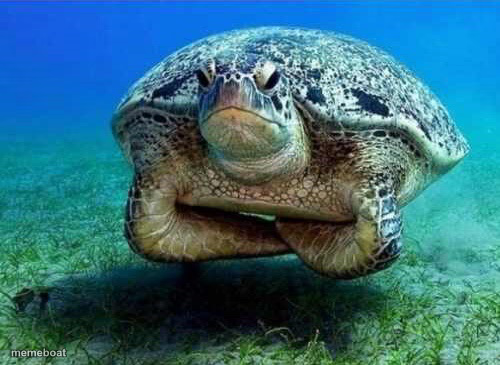
A sea turtle giving the camera a deeply unimpressed, judgmental stare underwater. Perfect for reaction memes about disappointment. Caption it free.
Blank Disappointed sea turtle meme template
Download the blank Disappointed sea turtle template to caption it yourself, or add your text right here in the editor above and download the finished meme.
When to use the Disappointed sea turtle meme
- Reacting to a friend's terrible life choice with zero words needed
- Your face when the group project got 60% done by one person
- Catching yourself doing the exact thing you swore you'd stop doing
Disappointed sea turtle template facts
- Dimensions
- 500 × 365 px
- Format
- JPG
- Added
- 2025
About the Disappointed sea turtle meme template
This turtle has seen some things and is not okay with any of them. That flat, half-lidded stare screams "I expected better from you" without saying a single word.
Use it whenever someone lets you down, whenever you catch yourself making a bad decision, or any moment that calls for silent, judgmental disappointment from the deep.
Templates similar to Disappointed sea turtle


Disappointed sea turtle meme FAQ
How do I make a Disappointed sea turtle meme?
Scroll up to the Disappointed sea turtle template, add your own text boxes in the editor above and type your captions, adjust the font, size and color if you like, then click download. Your finished Disappointed sea turtle meme is ready to share in seconds.
Can I use the Disappointed sea turtle template for free?
Yes. The Disappointed sea turtle template is completely free to use — no signup and no limits on how many memes you create or where you share them.
How do I download my Disappointed sea turtle meme?
Click the download button under the editor once your Disappointed sea turtle meme looks right. It saves straight to your device as a high-quality PNG or JPEG image.
How do I download the blank Disappointed sea turtle template?
Use the "Download blank template" button in the blank Disappointed sea turtle template section above to save the original, un-captioned image — handy if you'd rather caption it in another app or keep a copy.