
You're Not My Dad Meme Generator
Create Your You're Not My Dad Meme
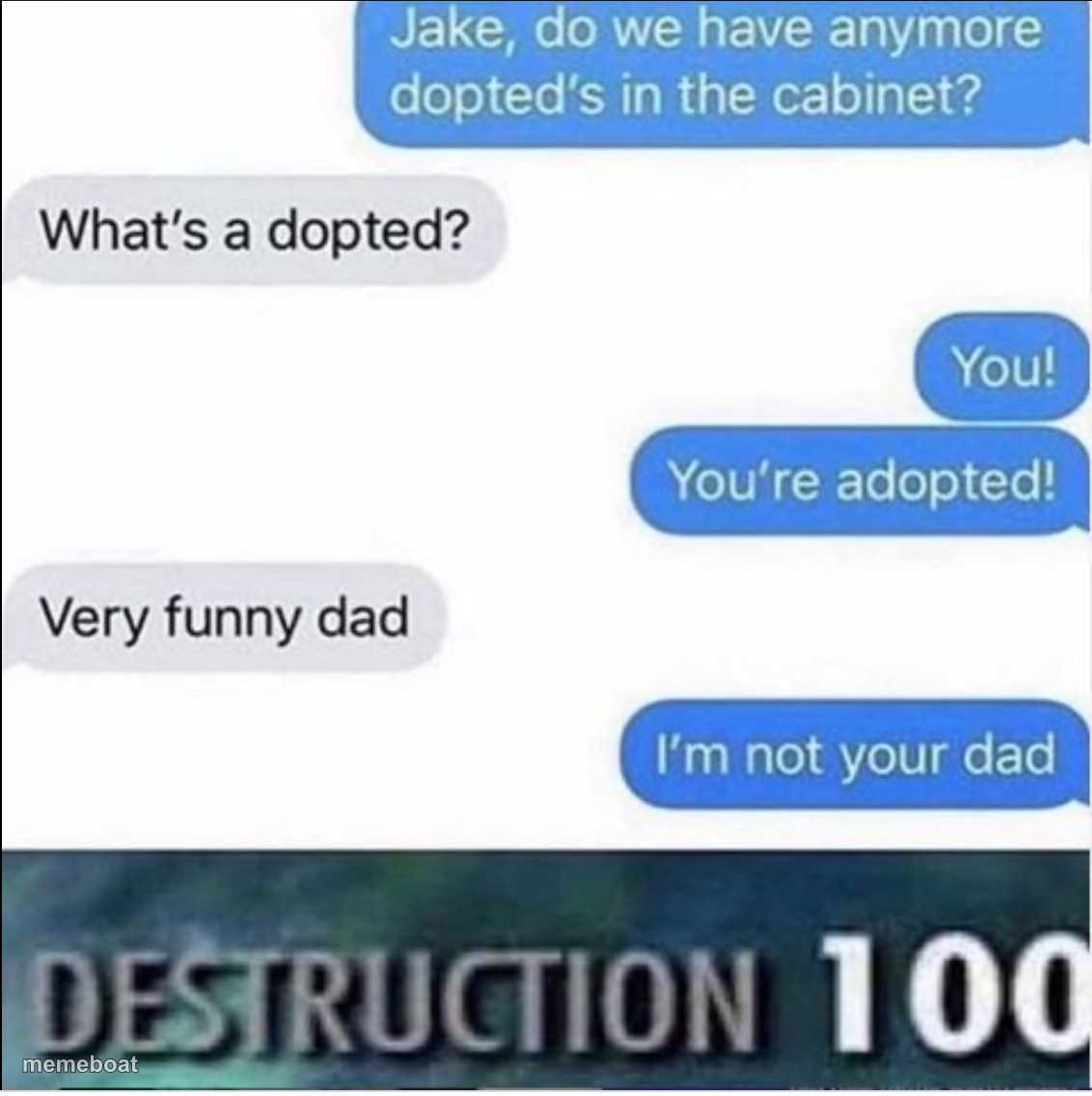
A texting prank goes sideways into a savage 'you're not my dad' twist, stamped with a Destruction 100 rating. Caption it and download free.
Blank You're Not My Dad meme template
Download the blank You're Not My Dad template to caption it yourself, or add your text right here in the editor above and download the finished meme.
When to use the You're Not My Dad meme
- Sibling teasing that ends with someone getting brutally roasted
- Any comeback so good it deserves an official damage rating
You're Not My Dad template facts
- Dimensions
- 1132 × 1136 px
- Format
- JPG
- Added
- 2025
About the You're Not My Dad meme template
This one's a text-message screenshot that escalates fast: an innocent question about snacks turns into an adoption joke, and then the dad drops the mic by denying he's even the dad. The 'DESTRUCTION 100' stamp underneath seals the deal — somebody just got wrecked in the family group chat.
Use this for any conversation that goes from zero to savage roast in four messages, especially sibling rivalry, parent-vs-kid banter, or that one friend who always has the perfect comeback loaded and ready.
Templates similar to You're Not My Dad


You're Not My Dad meme FAQ
How do I make a You're Not My Dad meme?
Scroll up to the You're Not My Dad template, add your own text boxes in the editor above and type your captions, adjust the font, size and color if you like, then click download. Your finished You're Not My Dad meme is ready to share in seconds.
Can I use the You're Not My Dad template for free?
Yes. The You're Not My Dad template is completely free to use — no signup and no limits on how many memes you create or where you share them.
How do I download my You're Not My Dad meme?
Click the download button under the editor once your You're Not My Dad meme looks right. It saves straight to your device as a high-quality PNG or JPEG image.
How do I download the blank You're Not My Dad template?
Use the "Download blank template" button in the blank You're Not My Dad template section above to save the original, un-captioned image — handy if you'd rather caption it in another app or keep a copy.