
SpongeBob Panic Face Meme Generator
Create Your SpongeBob Panic Face Meme
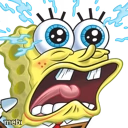
SpongeBob's wide-eyed, sweating, screaming panic face — the ultimate reaction to sudden dread. Caption it for any 'oh no' moment, free and easy.
Blank SpongeBob Panic Face meme template
Download the blank SpongeBob Panic Face template to caption it yourself, or add your text right here in the editor above and download the finished meme.
When to use the SpongeBob Panic Face meme
- Remembering an assignment due in 10 minutes
- That split second before you drop something expensive
SpongeBob Panic Face template facts
- Featuring
- SpongeBob SquarePants
- Dimensions
- 128 × 128 px
- Format
- PNG
- Text boxes
- 1
- Added
- 2025
About the SpongeBob Panic Face meme template
SpongeBob's eyes are bulging, his face is dripping sweat, and he's mid-scream — this is what pure, unfiltered panic looks like when it's rendered in cartoon form. There's no subtlety here, just full meltdown energy.
Popular SpongeBob Panic Face caption ideas
when you realize the meeting was 5 minutes ago
me checking if anyone saw my typo in the group chat
when the teacher says 'pop quiz'
Templates similar to SpongeBob Panic Face

SpongeBob Panic Face meme FAQ
How do I make a SpongeBob Panic Face meme?
Scroll up to the SpongeBob Panic Face template, type your caption into the text box in the editor above, adjust the font, size and color if you like, then click download. Your finished SpongeBob Panic Face meme is ready to share in seconds.
Can I use the SpongeBob Panic Face template for free?
Yes. The SpongeBob Panic Face template is completely free to use — no signup and no limits on how many memes you create or where you share them.
How do I download my SpongeBob Panic Face meme?
Click the download button under the editor once your SpongeBob Panic Face meme looks right. It saves straight to your device as a high-quality PNG or JPEG image.
How do I download the blank SpongeBob Panic Face template?
Use the "Download blank template" button in the blank SpongeBob Panic Face template section above to save the original, un-captioned image — handy if you'd rather caption it in another app or keep a copy.