
Freddy Fazbear Meme Generator
Create Your Freddy Fazbear Meme
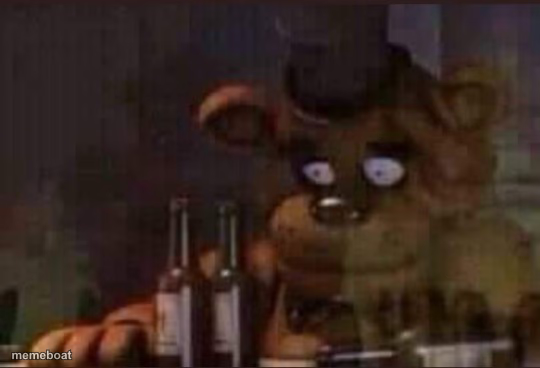
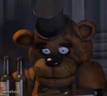
Freddy Fazbear staring blankly through the glass with a couple bottles in front of him — the classic 'rough night' animatronic mood. Free to caption.
Blank Freddy Fazbear meme template
Download the blank Freddy Fazbear template to caption it yourself, or add your text right here in the editor above and download the finished meme.
When to use the Freddy Fazbear meme
- Surviving finals week and it shows on your face
- That 3am stare after a rough shift at work
- When someone asks if you're okay and you are extremely not
Freddy Fazbear template facts
- Featuring
- Freddy Fazbear (Five Nights at Freddy's)
- Dimensions
- 540 × 368 px
- Format
- JPG
- Text boxes
- 2
- Added
- 2025
About the Freddy Fazbear meme template
Freddy's just standing there behind the glass, looking like he's had the longest shift of his cursed animatronic life. There are bottles on the counter and zero explanations, which honestly makes it funnier.
Popular Freddy Fazbear caption ideas
SORRY YOU CANT SEE YOUR FRIEND TO DAY · ME: LIFE IS MEANINGLESS
Me after night shift 5 · Send help
Freddy after finding out it's already Monday · Again
When you say 'I'm fine' but · Everyone can tell you're not
Templates similar to Freddy Fazbear



Freddy Fazbear meme FAQ
How do I make a Freddy Fazbear meme?
Scroll up to the Freddy Fazbear template, type your caption into the 2 text boxes in the editor above, adjust the font, size and color if you like, then click download. Your finished Freddy Fazbear meme is ready to share in seconds.
Can I use the Freddy Fazbear template for free?
Yes. The Freddy Fazbear template is completely free to use — no signup and no limits on how many memes you create or where you share them.
How do I download my Freddy Fazbear meme?
Click the download button under the editor once your Freddy Fazbear meme looks right. It saves straight to your device as a high-quality PNG or JPEG image.
How do I download the blank Freddy Fazbear template?
Use the "Download blank template" button in the blank Freddy Fazbear template section above to save the original, un-captioned image — handy if you'd rather caption it in another app or keep a copy.