
Thinking Gorilla Meme Generator
Create Your Thinking Gorilla Meme
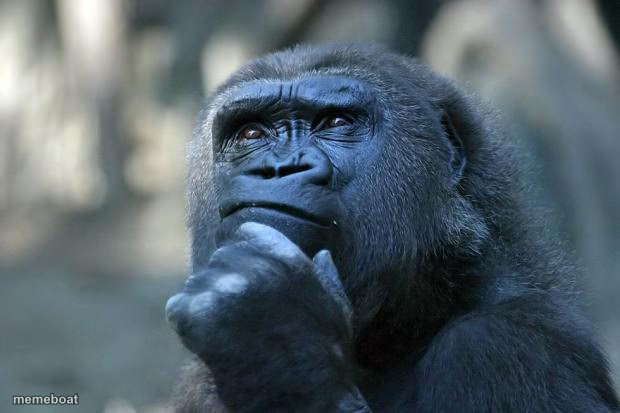
Also known as: Deep Thoughts
A gorilla resting its chin on its hand in a pensive pose, perfect for mock-deep thoughts and pondering questionable decisions. Caption it free and download instantly.
Blank Thinking Gorilla meme template
Download the blank Thinking Gorilla template to caption it yourself, or add your text right here in the editor above and download the finished meme.
When to use the Thinking Gorilla meme
- pretending to ponder deeply
- questionable life choices
- fake profound thought
Thinking Gorilla template facts
- Dimensions
- 620 × 413 px
- Format
- JPG
- Text boxes
- 2
- Added
- 2025
- Memes made
- 1
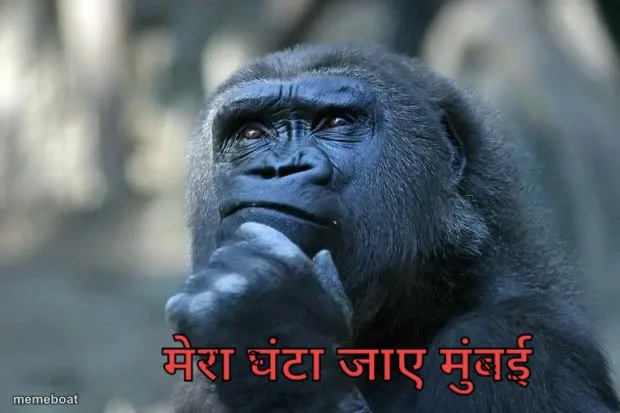
About the Thinking Gorilla meme template
The Deep Thoughts meme template features a contemplative gorilla, often paired with the phrase "that is the question," symbolizing deep reflection and humorous pondering. Originating from early internet culture and gaining traction around 2015 on platforms like Reddit and Twitter, this meme became a viral phenomenon for its clever and relatable take on everyday dilemmas. As a staple in meme culture, the Deep Thoughts meme taps into the universal human experience of overthinking, making it a timeless piece of social media entertainment.
Knowing how to use the Deep Thoughts meme template effectively can elevate your social media content with humor and relatability. Perfect for expressing moments of doubt, curiosity, or ironic questioning, this meme resonates well in funny reactions and relatable moments posts. Whether you're wondering about life's big questions or poking fun at trivial decisions, the Deep Thoughts meme is ideal for Instagram, Facebook, Twitter, and TikTok. To maximize engagement, post it during peak social media hours and pair it with witty captions that invite shares and comments.
Deep Thoughts remains popular because it’s easy to create, customize, and share across all major platforms. Our Deep Thoughts meme generator lets you personalize text instantly—no design skills needed—to produce viral, funny, and trending content. With quick and free meme making, you can generate hilarious memes that capture attention and boost your social media presence. Start creating your Deep Thoughts meme now and join millions who use this template to spark laughs and viral sharing worldwide.
Popular Thinking Gorilla caption ideas
Image Title
WHAT IF MEME IDEAS · WERE NEVER EXISTED
Deep Thoughts
IF A FLY LOSES ITS WINGS · IS IT CALLED A WALK
Thoughts raw from my mind
I WAS THINKING.. · ...IF WE USE SNAKE VENOM TO CURE SNAKE BITES, WHY CAN'T WE USE CANCER TO CURE CANCER?
iF...
IF A QUIZ IS QUIZZICAL · THEN WHAT IS A TEST?
...
IF HUMANS CALL FLIES "FLIES" · THEN DO FLIES CALL HUMANS "WALKIES"?
Deep Thoughts
WHEN I CLEAN THE VACUUM CLEANER · HAVE I BECOME THE VACUUM CLEANER?
hmmm
IF SOMEONE WEIGHING 500 POUNDS THREATENED TO SIT ON YOU.. · WOULD IT BE A DEATH THREAT?
Idk
IS STUPIDITY A ZOMBIE APOCALYPSE SURVIVAL TECHNIQUE · BECAUSE THE IDIOTS DON'T HAVE BRAINS?
Thoughts raw from my mind
I WAS THINKING.. · ...WHAT IF YOU WRAPPED WRAPPING PAPER AND GAVE IT AS A GIFT?
Deep Thoughts
I READ RECENTLY THAT NO TWO PEOPLE SEE COLORS EXACTLY THE SAME · SO COLOR IS JUST A PIGMENT OF MY IMAGINATION
Templates similar to Thinking Gorilla





Thinking Gorilla meme FAQ
How do I make a Thinking Gorilla meme?
Scroll up to the Thinking Gorilla template, type your caption into the 2 text boxes in the editor above, adjust the font, size and color if you like, then click download. Your finished Thinking Gorilla meme is ready to share in seconds.
Can I use the Thinking Gorilla template for free?
Yes. The Thinking Gorilla template is completely free to use — no signup and no limits on how many memes you create or where you share them.
How do I download my Thinking Gorilla meme?
Click the download button under the editor once your Thinking Gorilla meme looks right. It saves straight to your device as a high-quality PNG or JPEG image.
How do I download the blank Thinking Gorilla template?
Use the "Download blank template" button in the blank Thinking Gorilla template section above to save the original, un-captioned image — handy if you'd rather caption it in another app or keep a copy.