
Dap me up Meme Generator
Create Your Dap me up Meme
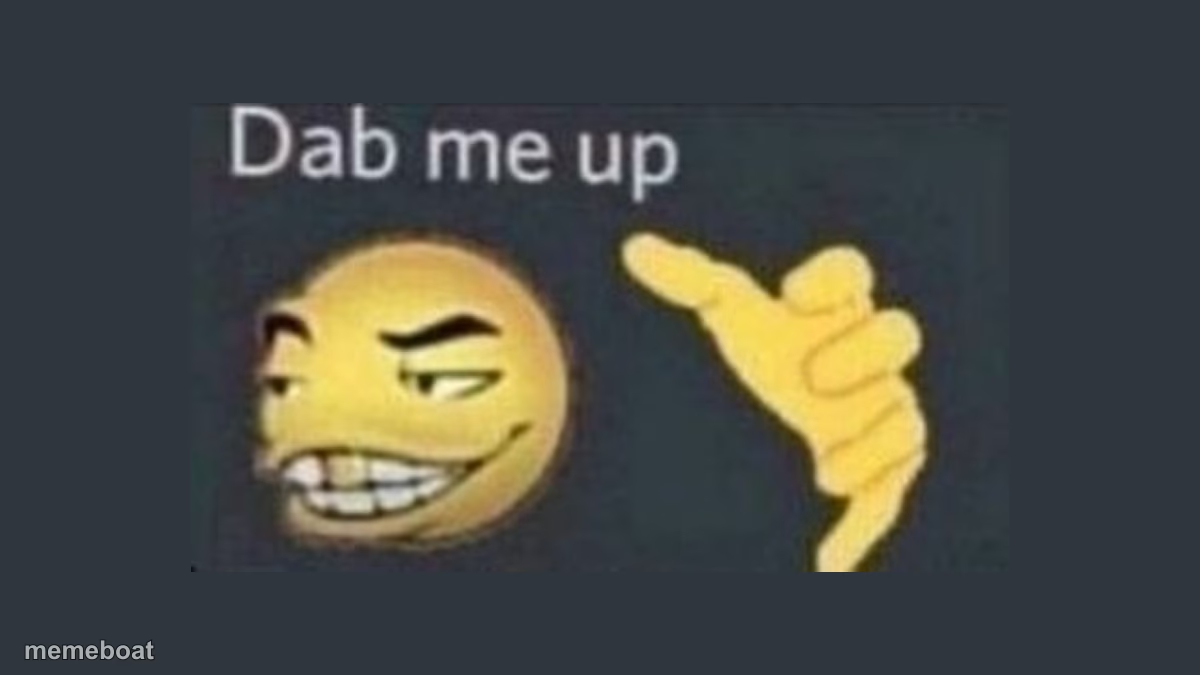
Smug yellow smiley face offering a fist bump next to Dab Me Up text — the go-to reaction for approval and solidarity. Free to caption and share.
Blank Dap me up meme template
Download the blank Dap me up template to caption it yourself, or add your text right here in the editor above and download the finished meme.
When to use the Dap me up meme
- Reacting to someone dropping a based opinion online
- Congratulating a friend who finally stood up for themselves
- Approving of a bold, slightly unhinged life decision
- Agreeing hard with a meme or tweet
Dap me up template facts
- Dimensions
- 1200 × 675 px
- Format
- JPG
- Added
- 2025
About the Dap me up meme template
A cocky yellow smiley with a gap-toothed grin holds out a fist for a bump, captioned "Dab me up." It's the internet's default reaction for when someone does something respectable, based, or just plain cool — you're not just agreeing, you're demanding a fist bump about it.
This one's built for approval humor. Someone posts a hot take you agree with, a friend makes a good decision, a stranger online says something genuinely based — this is the reply. Add your own top text for the trigger and let the smiley do the celebrating.
Popular Dap me up caption ideas
WHEN I MEET SOMEONE WITH MY SAME INTERESTS · ME:
Templates similar to Dap me up



Dap me up meme FAQ
How do I make a Dap me up meme?
Scroll up to the Dap me up template, add your own text boxes in the editor above and type your captions, adjust the font, size and color if you like, then click download. Your finished Dap me up meme is ready to share in seconds.
Can I use the Dap me up template for free?
Yes. The Dap me up template is completely free to use — no signup and no limits on how many memes you create or where you share them.
How do I download my Dap me up meme?
Click the download button under the editor once your Dap me up meme looks right. It saves straight to your device as a high-quality PNG or JPEG image.
How do I download the blank Dap me up template?
Use the "Download blank template" button in the blank Dap me up template section above to save the original, un-captioned image — handy if you'd rather caption it in another app or keep a copy.