
Daniel Craig Smirking Meme Generator
A well-lit still shot features actor Daniel Craig, known for his role as James Bond, seated and sporting a subtle smirk or sarcastic expression.
Create Your Daniel Craig Smirking Meme
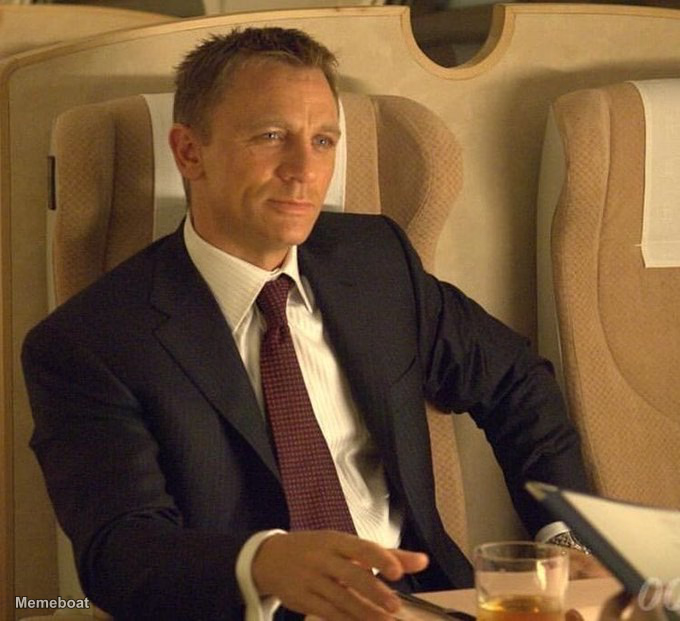
Blank Daniel Craig Smirking meme template
Download the blank Daniel Craig Smirking template to caption it yourself, or add your text right here in the editor above and download the finished meme.
Daniel Craig Smirking template facts
- Dimensions
- 680 × 621 px
- Format
- WEBP
- Text boxes
- 2
- Added
- 2026
About the Daniel Craig Smirking meme template
A well-lit still shot features actor Daniel Craig, known for his role as James Bond, seated and sporting a subtle smirk or sarcastic expression. He is formally dressed in a dark suit with a white shirt and a patterned burgundy tie, leaning back comfortably in what appears to be a luxurious cabin, possibly on a private jet or train. A glass with an amber liquid sits on a table in front of him, and part of a document or menu with '00' visible is also on the table.
Popular Daniel Craig Smirking caption ideas
when you realize you control the future
friday afternoon meeting got cancelled
Templates similar to Daniel Craig Smirking

Daniel Craig Smirking meme FAQ
How do I make a Daniel Craig Smirking meme?
Scroll up to the Daniel Craig Smirking template, type your caption into the 2 text boxes in the editor above, adjust the font, size and color if you like, then click download. Your finished Daniel Craig Smirking meme is ready to share in seconds.
Can I use the Daniel Craig Smirking template for free?
Yes. The Daniel Craig Smirking template is completely free to use — no signup and no limits on how many memes you create or where you share them.
How do I download my Daniel Craig Smirking meme?
Click the download button under the editor once your Daniel Craig Smirking meme looks right. It saves straight to your device as a high-quality PNG or JPEG image.
How do I download the blank Daniel Craig Smirking template?
Use the "Download blank template" button in the blank Daniel Craig Smirking template section above to save the original, un-captioned image — handy if you'd rather caption it in another app or keep a copy.