
Crying man Meme Generator
Create Your Crying man Meme
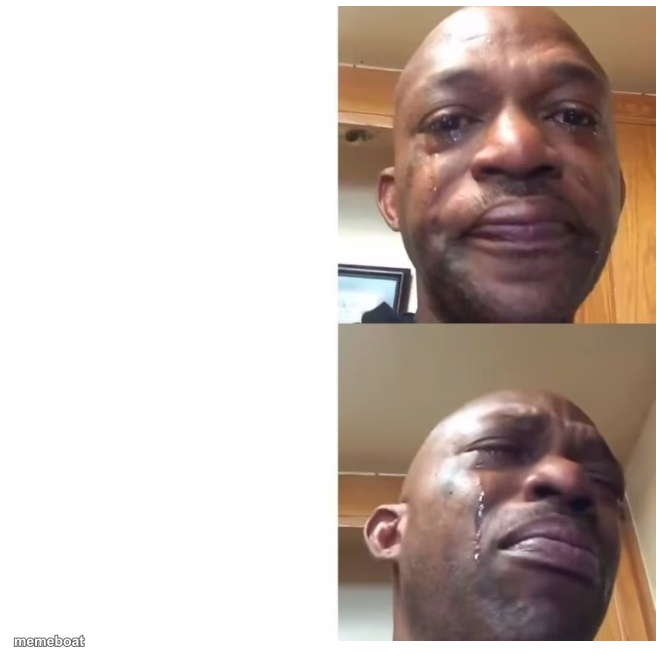
Two-panel selfie of a man crying, tears streaking down his face in both shots. Perfect for over-the-top sad or dramatic reactions. Caption it free.
Blank Crying man meme template
Download the blank Crying man template to caption it yourself, or add your text right here in the editor above and download the finished meme.
Crying man template facts
- Dimensions
- 668 × 660 px
- Format
- PNG
- Text boxes
- 2
- Added
- 2025
About the Crying man meme template
This one's raw: a guy taking a selfie video mid-cry, tears running down his cheeks in two consecutive frames. No filter, no punchline needed in the photo itself — it's the internet's go-to face for 'I am not okay but I'm still filming this.'
Use it for anything that hits harder than it should: bills, breakups, bad grades, your team blowing a lead in the last five minutes. The two panels let you build a little emotional arc — devastated, then somehow more devastated.
Popular Crying man caption ideas
YOU GET SICK · IT'S ON THE WEEKEND
me: i'm fine · also me: *watches one sad commercial*
opening the group chat · seeing i got left on read by everyone
when the waiter says no more free refills · internally: this is the darkest timeline
Templates similar to Crying man






Crying man meme FAQ
How do I make a Crying man meme?
Scroll up to the Crying man template, type your caption into the 2 text boxes in the editor above, adjust the font, size and color if you like, then click download. Your finished Crying man meme is ready to share in seconds.
Can I use the Crying man template for free?
Yes. The Crying man template is completely free to use — no signup and no limits on how many memes you create or where you share them.
How do I download my Crying man meme?
Click the download button under the editor once your Crying man meme looks right. It saves straight to your device as a high-quality PNG or JPEG image.
How do I download the blank Crying man template?
Use the "Download blank template" button in the blank Crying man template section above to save the original, un-captioned image — handy if you'd rather caption it in another app or keep a copy.