
Connor Mcdavid Meme Generator
Create Your Connor Mcdavid Meme
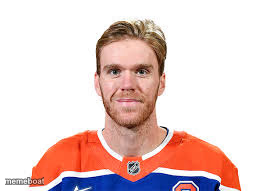
NHL superstar Connor McDavid's headshot — ideal for hockey jokes, GOAT debates, and 'fastest guy on the ice' comparisons. Free to caption and download.
Blank Connor Mcdavid meme template
Download the blank Connor Mcdavid template to caption it yourself, or add your text right here in the editor above and download the finished meme.
When to use the Connor Mcdavid meme
- Comparing yourself to someone way faster or more skilled at literally anything
- Hockey fan debates about the best player in the league
- 'Me pretending I could keep up' style self-deprecating jokes
Connor Mcdavid template facts
- Featuring
- Connor McDavid (NHL / Edmonton Oilers)
- Dimensions
- 263 × 191 px
- Format
- JPG
- Text boxes
- 2
- Added
- 2025
About the Connor Mcdavid meme template
Connor McDavid, staring straight ahead in his Oilers jersey like he's already three steps ahead of everyone else on the ice. This one's built for hockey fans who need a face for their skill-gap jokes.
Popular Connor Mcdavid caption ideas
HI MY NAME IS CONNOR · AND I CHEAT MY WAY THROUGH LIVE
Me on the ice vs Connor McDavid · on the same ice
Him: skates twice a year · Also him: fastest man alive



Connor Mcdavid meme FAQ
How do I make a Connor Mcdavid meme?
Scroll up to the Connor Mcdavid template, type your caption into the 2 text boxes in the editor above, adjust the font, size and color if you like, then click download. Your finished Connor Mcdavid meme is ready to share in seconds.
Can I use the Connor Mcdavid template for free?
Yes. The Connor Mcdavid template is completely free to use — no signup and no limits on how many memes you create or where you share them.
How do I download my Connor Mcdavid meme?
Click the download button under the editor once your Connor Mcdavid meme looks right. It saves straight to your device as a high-quality PNG or JPEG image.
How do I download the blank Connor Mcdavid template?
Use the "Download blank template" button in the blank Connor Mcdavid template section above to save the original, un-captioned image — handy if you'd rather caption it in another app or keep a copy.